Check an InDesign Table of Contents Against Its Headings Before You Export
This article is also available as a short video on YouTube: InDesign Table of Contents Out of Date? Check It Before You Update
A reader on r/indesign changed a chapter heading after the table of contents was generated, forgot to update it, and found the mismatch after printing. Preflight has no rule for this.
If you have not edited the table of contents by hand, the fix is to choose Layout > Update Table of Contents right before you export. The script below is for the cases where you want to see what is out of date first: the contents page has hand edits that an update would replace, you are checking a file someone else prepared, or the table of contents collects headings from every chapter of a book.
What the script reports
Run it with the document that holds the table of contents active. It changes nothing and shows one alert. These are the messages from my test document after I edited one heading, moved one heading to another page, added a heading, and deleted one:
Not in TOC (p.3): Loading roll paper
Page moved 4 -> 6: Printing labels
Not in TOC (p.5): Troubleshooting
No matching heading: Loading paper3
No matching heading: Cleaning ... 5
(1 heading(s) on the pasteboard or overset were skipped.)
- Not in TOC is a heading on a page with no table of contents line that has the same text. An edited heading shows up twice: once here with its new text, and once as a line with no matching heading.
- Page moved means the text matches but the page number in the table of contents is not the page the heading is on now. If two headings have the same text, such as a Summary in every chapter, each one is first paired with the line that has its own page number.
- No matching heading is a table of contents line whose heading no longer exists with that text. The line is shown whole, with " ... " where it has a tab, so "Cleaning ... 5" is the entry for Cleaning on page 5. "Loading paper3" had no tab between the entry and its page number.
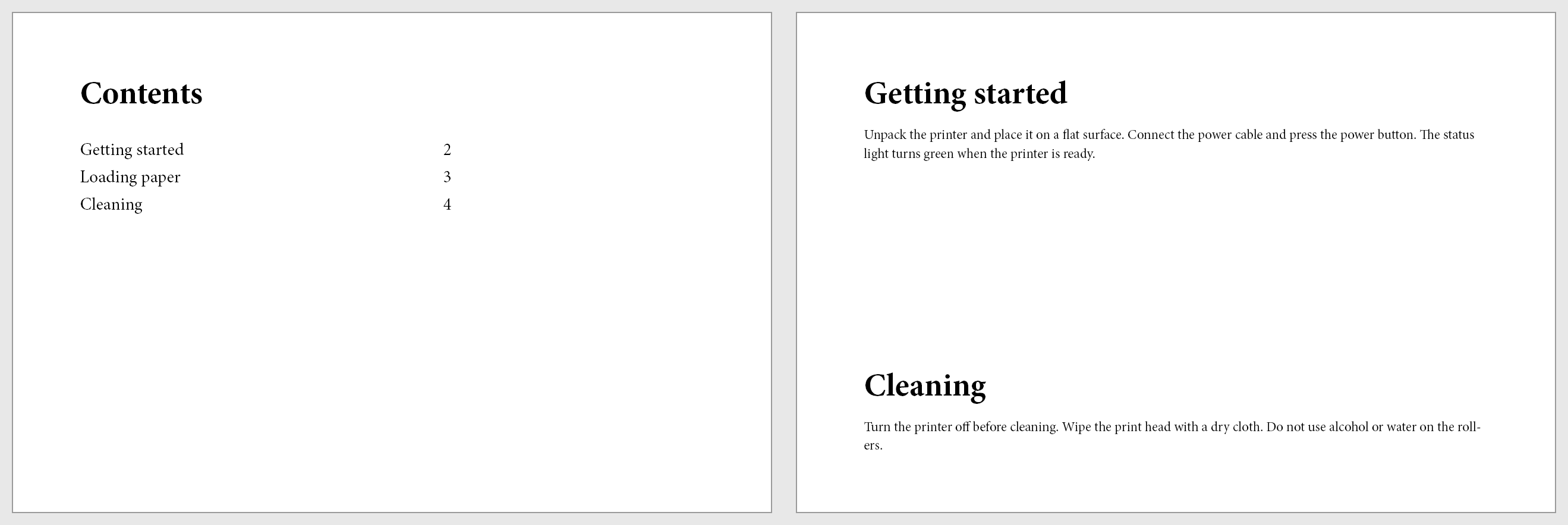
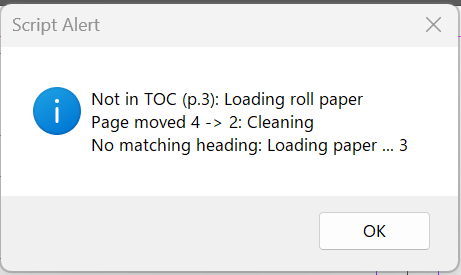
When everything matches, the alert says so and gives the number of headings checked.
How it reads a contents line
Each heading's paragraph style has an entry in the table of contents style, and the entry says whether page numbers are shown. The script reads that setting for each heading.
If the entry shows no page number, the whole contents line must be the heading, and the page is not checked.
If the entry shows page numbers, the script accepts one of these:
- The text before the last tab is the heading. What follows the tab is the page number.
- The line starts with the heading and the rest is digits or a roman numeral. This is the case when the entry has no tab before the number, as in "Loading paper3" above.
The second one is a guess. If a heading "Part1" on page 2 is renamed "Part" and moves to page 12, the line "Part12" looks correct. Set a tab as the separator in the table of contents style if you can.
Text is compared after line breaks, tabs and repeated spaces are reduced to one space. A forced line break inside a heading, as in "Getting / started", still matched. An entry that was shortened on purpose does not match, so if your contents page uses shorter titles than the headings, expect those lines in the report every time.
What it compares
The script finds the table of contents by story type, so it does not matter which frame or page it is on. To tell which table of contents style made it, the script compares the paragraph styles of the contents lines (not the title) with the entry styles set in each table of contents style. Only the styles that match are read, so a figure list style with different entry styles is left out.
This is an inference, and it can fail two ways. If two styles use the same entry styles, the script cannot tell them apart. It combines them and names them in the alert. If one of them has Include Book Documents turned on, that means it asks you to open a book even for a single document. If one shows page numbers for an entry and the other does not, both readings are tried for that entry. If you restyled the contents lines by hand so that no style matches, the script stops and checks nothing.
From that style it collects every paragraph in the included paragraph styles. Styles in a style group are matched with the group name, so Heads:Section and Sidebar:Section are kept apart.
Some headings are skipped and counted at the end of the alert:
- Headings that are not on a page, because they sit on the pasteboard or in overset text. In my test, a heading on the pasteboard was also missing from the generated table of contents. I did not test overset text.
- Headings on a hidden layer, unless the table of contents style has Include Text on Hidden Layers turned on.
Headings with automatic numbering appeared in my generated tables of contents with their number in front, as in "1. Getting started". The script reads each heading's current number from InDesign and accepts a contents line only if it is the number and the text, or the text alone. A line with an old number, such as "99. Cleaning", is reported as not matching.
Books
If the table of contents style has Include Book Documents turned on, open the book (.indb) before running the script. The script then reads the headings in every chapter of that book. Chapters that are not open are opened without a window and closed again without saving. Chapters you already have open are read from the open document and left open.
Page numbers come from the pages in each chapter, so they follow the book's numbering. In my test I had renamed a heading in the second chapter, then added a page at the start of the first chapter and repaginated the book. The three headings with unchanged text were reported as moved, with the chapter file name:
Page moved 2 -> 3 (ch1.indd): Getting started
Page moved 3 -> 4 (ch1.indd): Loading paper
Page moved 5 -> 6 (ch2.indd): Printing labels
Not in TOC (ch2.indd p.7): Cleaning the head
No matching heading: Cleaning ... 6
If a chapter file is missing, the alert lists it, and its contents lines show up as having no matching heading. Those lines mean the chapter could not be read, not that the headings were deleted. If nothing else differs, for example when the missing chapter has no headings, the alert says the book was not fully checked instead of saying it matches.
If the book is not open, the script stops with a message asking you to open it, instead of checking only the current file.
The script
Download CheckTOC.jsx from GitHub, or copy the code below. The test scripts and their log are in the repository.
Save this as CheckTOC.jsx in your Scripts folder and run it from the Scripts panel. If you have not installed a script before, Your First InDesign Script shows where the folder is and what to watch for when pasting code into a text editor.
Show the full script
// CheckTOC.jsx - compare the TOC in the active document with its headings.
// Lists headings missing from the TOC, page numbers that moved,
// and TOC lines whose heading no longer exists. Changes nothing.
// If the TOC style uses "Include Book Documents", open the book first:
// the script then reads the headings in every chapter of that book.

var JUNK = new RegExp("[\\r\\n\\t\\x03\\uFFFC\\uFEFF]", "g");

function clean(s) {
    return String(s).replace(JUNK, " ").replace(/\s+/g, " ").replace(/^\s+|\s+$/g, "");
}

function pathOf(d) {
    try { return d.fullName.fsName; } catch (e) { return ""; } // unsaved document
}

// "Heads:Section" for a style inside the group Heads, like TOC style entries
function stylePath(s) {
    var parts = [s.name], p = s.parent;
    while (p && p.constructor.name === "ParagraphStyleGroup") { parts.unshift(p.name); p = p.parent; }
    return parts.join(":");
}

function tocStories(d) {
    var a = [];
    for (var i = 0; i < d.stories.length; i++) {
        if (d.stories[i].storyType == StoryTypes.TOC_STORY) { a.push(d.stories[i]); }
    }
    return a;
}

// Reads TOC lines (only from the TOC document) and headings from document d.
function readDoc(d, set, readToc, r) {
    for (var i = 0; i < d.stories.length; i++) {
        var st = d.stories[i];
        var isToc = st.storyType == StoryTypes.TOC_STORY;
        if (isToc && !readToc) { continue; }
        for (var k = 0; k < st.paragraphs.length; k++) {
            var p = st.paragraphs[k];
            var raw = String(p.contents).replace(/\r$/, "");
            if (isToc) {
                var t = clean(raw);
                if (!t || (k === 0 && set.titles[t])) { continue; } // the TOC title
                // shown whole in the report, a tab as " ... ": "Cleaning ... 5"
                r.toc.push({ raw: raw, t: clean(raw.replace(/\t/g, " ... ")) });
            } else if (set.styles[stylePath(p.appliedParagraphStyle)]) {
                var mode = set.styles[stylePath(p.appliedParagraphStyle)];
                var h = clean(raw);
                if (!h) { continue; }
                var fr = p.characters[0].parentTextFrames[0];
                if (!fr || !fr.parentPage) { r.skipped++; continue; } // pasteboard or overset
                if (!set.hidden && !fr.itemLayer.visible) { r.hidden++; continue; }
                // a numbered heading appears in the TOC with its current number, e.g. "2. Cleaning"
                var keys = [h];
                if (p.bulletsAndNumberingListType == ListType.NUMBERED_LIST) {
                    keys.unshift(clean(p.bulletsAndNumberingResultText + " " + h));
                }
                r.heads.push({ t: h, keys: keys, mode: mode, pg: fr.parentPage.name, doc: d.name });
            }
        }
    }
}

// Page number the TOC line e gives for heading h: "" if the line has no page number,
// null if e is not that heading. h.mode is the TOC entry's page number setting:
// "page", "none", or "either" when combined TOC styles disagree.
function pageFor(e, h) {
    var tab = e.raw.lastIndexOf("\t"), whole = clean(e.raw);
    for (var i = 0; i < h.keys.length; i++) {
        var key = h.keys[i];
        if (h.mode !== "page" && whole === key) { return ""; } // TOC entry without page numbers
        if (h.mode === "none") { continue; }
        if (tab >= 0 && clean(e.raw.substring(0, tab)) === key) { return clean(e.raw.substring(tab + 1)); }
        if (whole.indexOf(key) === 0) { // no tab: the page number is glued to the entry
            var rest = clean(whole.substring(key.length).replace(/^[\s.]+/, ""));
            if (/^(\d+|[ivxlcdm]+)$/i.test(rest)) { return rest; } // digits only: a guess
        }
    }
    return null;
}

function checkTOC(doc) {
    var i, j, k, tocs = tocStories(doc);
    if (!tocs.length) { return "No table of contents found in this document."; }
    // paragraph styles of the TOC entries (not the title), to tell which TOC style made it
    var anyTitle = {}, inToc = {};
    for (i = 0; i < doc.tocStyles.length; i++) { if (doc.tocStyles[i].title) { anyTitle[clean(doc.tocStyles[i].title)] = true; } }
    for (i = 0; i < tocs.length; i++) {
        for (k = 0; k < tocs[i].paragraphs.length; k++) {
            var tp = tocs[i].paragraphs[k];
            if (k === 0 && anyTitle[clean(tp.contents)]) { continue; }
            inToc[stylePath(tp.appliedParagraphStyle)] = true;
        }
    }
    var used = [];
    for (i = 0; i < doc.tocStyles.length; i++) {
        var ts = doc.tocStyles[i];
        for (j = 0; j < ts.tocStyleEntries.length; j++) {
            var en = ts.tocStyleEntries[j], fs = en.formatStyle;
            var look = (typeof fs === "string" || !fs.name) ? en.name : stylePath(fs); // [Same Style]
            if (inToc[look]) { used.push(ts); break; }
        }
    }
    if (!used.length) {
        return "Could not tell which table of contents style made this table of contents: its lines use none of the entry styles in Layout > Table of Contents Styles. Nothing was checked.";
    }
    var set = { styles: {}, titles: {}, hidden: false }, wantBook = false;
    for (i = 0; i < used.length; i++) {
        if (used[i].title) { set.titles[clean(used[i].title)] = true; }
        if (used[i].includeBookDocuments) { wantBook = true; }
        if (used[i].includeHidden) { set.hidden = true; }
        for (j = 0; j < used[i].tocStyleEntries.length; j++) {
            var te = used[i].tocStyleEntries[j], m = te.pageNumberPosition == PageNumberPosition.NONE ? "none" : "page";
            set.styles[te.name] = (set.styles[te.name] && set.styles[te.name] !== m) ? "either" : m;
        }
    }
    var r = { toc: [], heads: [], skipped: 0, hidden: 0 }, notes = [];
    if (used.length > 1) {
        var names = [];
        for (i = 0; i < used.length; i++) { names.push(used[i].name); }
        notes.push("These TOC styles use the same entry styles, so their headings were combined: " + names.join(", ") + ".");
    }
    var me = pathOf(doc), book = null;
    if (wantBook && me) {
        for (i = 0; i < app.books.length && !book; i++) {
            for (j = 0; j < app.books[i].bookContents.length; j++) {
                if (app.books[i].bookContents[j].fullName.fsName === me) { book = app.books[i]; break; }
            }
        }
    }
    if (wantBook && !book) {
        return ["This TOC takes headings from a book. Open the book (.indb) that contains this document and run the script again."].concat(notes).join("\n");
    }
    var missing = 0;
    if (!book) {
        readDoc(doc, set, true, r);
    } else {
        for (j = 0; j < book.bookContents.length; j++) {
            var bc = book.bookContents[j], f = bc.fullName, d = null, opened = false;
            if (!f.exists) { notes.push("Missing chapter file: " + bc.name); missing++; continue; }
            for (i = 0; i < app.documents.length; i++) {
                if (pathOf(app.documents[i]) === f.fsName) { d = app.documents[i]; break; }
            }
            if (!d) { d = app.open(f, false); opened = true; }
            try { readDoc(d, set, pathOf(d) === me, r); }
            finally { if (opened) { d.close(SaveOptions.NO); } }
        }
    }
    var out = [], taken = [], toc = r.toc, heads = r.heads, pages = [];
    // first pass: same text on the same page; second pass: same text anywhere
    for (var pass = 0; pass < 2; pass++) {
        for (i = 0; i < heads.length; i++) {
            if (pages[i] !== undefined) { continue; }
            for (j = 0; j < toc.length; j++) {
                if (taken[j]) { continue; }
                var pg = pageFor(toc[j], heads[i]);
                if (pg !== null && (pass === 1 || pg === heads[i].pg)) { taken[j] = true; pages[i] = pg; break; }
            }
        }
    }
    for (i = 0; i < heads.length; i++) {
        var h = heads[i], where = (book ? h.doc + " " : "") + "p." + h.pg;
        if (pages[i] === undefined) { out.push("Not in TOC (" + where + "): " + h.t); }
        else if (pages[i] !== "" && pages[i] !== h.pg) { out.push("Page moved " + pages[i] + " -> " + h.pg + (book ? " (" + h.doc + ")" : "") + ": " + h.t); }
    }
    for (j = 0; j < toc.length; j++) {
        if (!taken[j]) { out.push("No matching heading: " + toc[j].t); }
    }
    if (!out.length) {
        out.push(missing ? "No differences in the chapters that could be read. The book was not fully checked."
            : "TOC matches the headings (" + heads.length + " checked" + (book ? " in " + book.name : "") + ").");
    }
    if (r.skipped) { out.push("(" + r.skipped + " heading(s) on the pasteboard or overset were skipped.)"); }
    if (r.hidden) { out.push("(" + r.hidden + " heading(s) on hidden layers were skipped.)"); }
    return out.concat(notes).join("\n");
}

if (app.documents.length) { alert(checkTOC(app.activeDocument)); }
What I tested
I tested the script in InDesign 21.6 on Windows. The test documents were built by a test script: one document of six pages with two heading levels, one of them in a style group, a small book with a front-matter file and two chapters, and small documents for the last eighteen cases in the table. I ran each step from the test script. I also ran the script from the Scripts panel on a small document of my own, with a heading edited and another moved to a different page, and the alert matched the test output.
| Change | Report |
|---|---|
| None, right after generating | Matches (4 headings) |
| Heading text edited | Not in TOC + No matching heading |
| Heading frame moved to another page | Page moved |
| New heading added, one more on the pasteboard | Not in TOC, and 1 skipped |
| Heading frame deleted | No matching heading |
| Table of contents generated again | Matches |
| Book: heading edited in an open chapter | Not in TOC + No matching heading |
| Book: page added to the first chapter | Page moved for the three unchanged headings; the edited one as before |
| Book: a chapter file moved away | No matching heading for its lines, and the missing file listed |
| Book: a chapter with no headings moved away | Not fully checked, and the missing file listed |
| Book closed | Asks you to open the book |
| Two headings "Summary" on different pages | Matches |
| An unused figure list style with Include Book Documents on | Matches, no request to open a book |
| Heads:Section in the TOC, Sidebar:Section not | Matches |
| A heading on a hidden layer | Matches, and 1 skipped |
| Two numbered headings, no tab before the page number | Matches |
| A heading with the same text as the TOC title | Matches |
| No tab, heading "PrintingLabels" shortened to "Printing" | Not in TOC + No matching heading |
| The TOC title uses the same paragraph style as an unused figure list style | Matches |
| Contents lines restyled by hand | Stops: could not tell which style made the TOC |
| Short numbered headings "API" and "UI", no tab | Matches |
| A contents line edited to "99. Cleaning" | Not in TOC + No matching heading |
| A contents line edited to "Wrong Cleaning" | Not in TOC + No matching heading |
| No page numbers in the TOC, heading moved | Matches (pages not checked) |
| Chapters without page numbers, sections with, both moved | Page moved for the section only |
| Two TOC styles with the same entry style, one for a book | Asks you to open the book, and names both styles |
| "Part ... 2" in the TOC, heading renamed "Part 2" and moved to page 5 | Not in TOC + No matching heading |
| No page numbers, "Getting ... started" in the TOC, heading shortened to "Getting" | Not in TOC + No matching heading |
| Numbered heading "API" renamed "SDK", no tab | Not in TOC + No matching heading: 1. ... API2 |
These last eighteen cases come from three rounds of review. The version I posted on Reddit got the first seven wrong. My first revision passed those seven, got the next seven wrong, and left the style names out of the fifteenth. My second revision got two of the last three wrong and showed the old line in the third as just "1.".
I did not test macOS, other InDesign versions, page numbers with section prefixes, a table of contents with the page number before the entry, run-in entries, a document with more than one table of contents, chapters with unsaved changes, headings in overset text, or numbered headings with numbering settings changed in the TOC style.