Why InDesign Asks for a Replacement When You Delete an Unused Paragraph Style
You try to delete a paragraph style you stopped using, and InDesign asks which style to replace it with. Find/Change finds no text with that style.
I confirmed that a Based On reference can cause this: if another paragraph style is based on the one you're deleting, InDesign asks for a replacement even though no text uses it. When nothing references the style, InDesign deletes it without asking.
A Based On reference can appear without you choosing it. If you create a new paragraph style while your cursor is in a paragraph, InDesign sets the new style's Based On to that paragraph's style. Style Options shows what the current style is based on, but I did not find a panel that lists the styles based on it.
Where a paragraph style can be referenced
Besides text, a paragraph style can be named in:
- another paragraph style's Based On
- the Next Style of any paragraph style, not only styles based on it
- an object style or a cell style that applies a paragraph style
- a TOC style: its title style, a style included in the TOC, or the style used for an entry
- Footnote Options and Endnote Options
- the Generate Index settings (title, levels, section headings)
- a Running Header (Paragraph Style) text variable
- the document's default paragraph style
I confirmed the delete prompt for Based On. I have not tested whether the other reference types trigger that prompt.
These references are stored in style definitions and document settings. Find/Change searches text, so it doesn't report them.
Text that Find/Change skips by default
Find/Change doesn't search text on parent pages or on hidden layers unless you turn on those buttons in the search options. Both are off by default, so a default search returns nothing for a style that is only applied there.
A script that checks common paragraph-style references
You select a paragraph style by its group path, so styles with the same name in different groups stay separate. The script checks text and the reference types listed above, and lists any part of the check it could not complete. Before searching, it saves the Find Text criteria and the five search options it changes. Afterward, it attempts to restore them and reports any that could not be restored. Text results show an approximate location and the first few words.
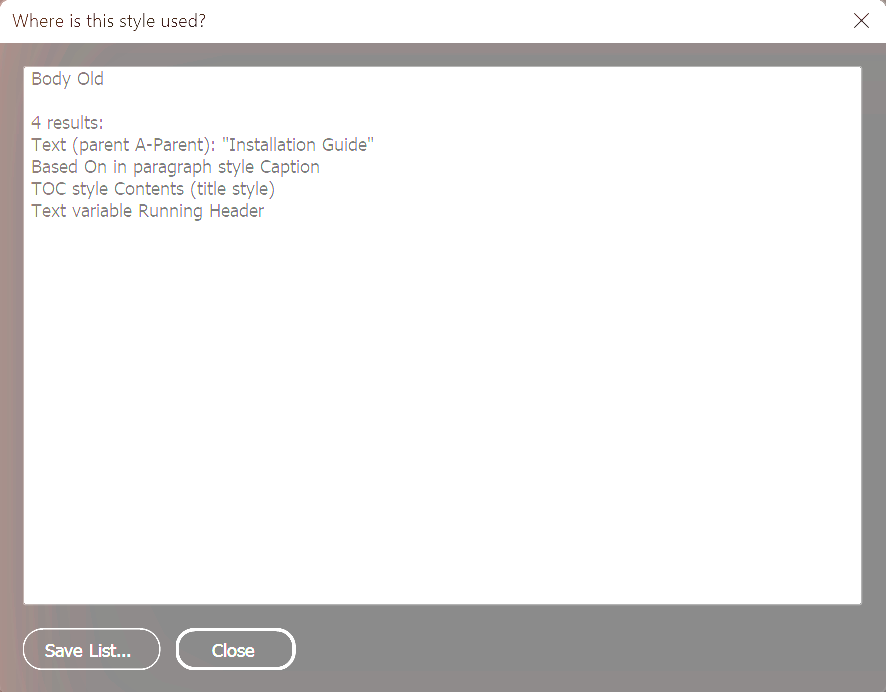
// WhereIsThisStyleUsed.jsx
// Pick one paragraph style and list the text and the settings that reference it.
// The Find Text criteria and the search options it changes are saved first and restored at the end.
(function () {

  var MAX_SHOWN = 100;

  function pathOf(st, sep) {
    var p = st.name, g = st.parent;
    while (g && g.constructor && g.constructor.name == "ParagraphStyleGroup") { p = g.name + (sep || "/") + p; g = g.parent; }
    return p;
  }

  // Approximate location of one text search result.
  function locate(t) {
    var kind = "", o = t, n = 0;
    try {
      while (o && n < 10) {
        var c = o.constructor.name;
        if (c == "Footnote") { kind = "footnote, "; break; }
        if (c == "Cell") { kind = "table cell, "; break; }
        if (c == "Story" || c == "Document") break;
        o = o.parent; n++;
      }
    } catch (e) {}
    var frames;
    try { frames = t.parentTextFrames; } catch (e) { return kind + "location unknown"; }
    if (!frames || frames.length == 0) return kind + "no text frame (overset text)";
    var pages = [], seen = {}, hidden = [];
    for (var i = 0; i < frames.length; i++) {
      var label;
      try {
        var pg = frames[i].parentPage;
        if (!pg) label = "no parent page";
        else if (pg.parent.constructor.name == "MasterSpread") label = "parent " + pg.parent.name;
        else label = "page " + pg.name;
      } catch (e) { label = "location unknown"; }
      if (!seen[label]) { seen[label] = true; pages.push(label); }
      try { if (!frames[i].itemLayer.visible && !seen["L" + frames[i].itemLayer.name]) {
        seen["L" + frames[i].itemLayer.name] = true; hidden.push(frames[i].itemLayer.name); } } catch (e) {}
    }
    return kind + pages.join(", ") + (hidden.length ? " (hidden layer " + hidden.join(", ") + ")" : "");
  }

  function check(doc, target) {
    var found = [], warn = [], restore = [];
    var targetPath = pathOf(target, ":");
    var ps = [], sameName = 0, sameNameKnown = false, rootId = null;
    try {
      ps = doc.allParagraphStyles; rootId = doc.paragraphStyles[0].id;
      for (var i = 0; i < ps.length; i++) if (ps[i].name == target.name) sameName++;
      sameNameKnown = true;
    } catch (e) { ps = []; warn.push("Paragraph styles: could not be listed, so Based On and Next Style were not checked (" + e.message + ")"); }

    // isPath: the setting stores the style as a path, e.g. "Group:Style" (TOC entries do).
    function test(label, getter, isPath) {
      try {
        var ref = getter();
        if (ref == null) return;
        if (typeof ref == "string") {
          if (isPath) { if (ref == targetPath) found.push(label); }
          else if (ref == target.name) {
            if (!sameNameKnown) warn.push(label + ": names \"" + ref + "\", but the script could not determine which paragraph style it refers to");
            else if (sameName == 1) found.push(label);
            else warn.push(label + ": names \"" + ref + "\", and more than one style has that name");
          }
          return;
        }
        if (ref.constructor.name == "ParagraphStyle" && ref.id == target.id) found.push(label);
      } catch (e) { warn.push(label + ": could not be checked (" + e.message + ")"); }
    }
    function section(name, fn) {
      try { fn(); } catch (e) { warn.push(name + ": could not be checked (" + e.message + ")"); }
    }

    // 1. Text that has the style
    var fo = app.findChangeTextOptions;
    var keys = ["includeMasterPages", "includeHiddenLayers", "includeLockedLayersForFind",
                "includeLockedStoriesForFind", "includeFootnotes"];
    var savedOpts = {}, savedFind = null, k;
    try {
      savedFind = app.findTextPreferences.properties;
      for (k = 0; k < keys.length; k++) savedOpts[keys[k]] = fo[keys[k]];
    } catch (e) { warn.push("Find/Change state could not be saved, so the text search was skipped"); savedFind = null; }
    if (savedFind) {
      try {
        for (k = 0; k < keys.length; k++) fo[keys[k]] = true;
        app.findTextPreferences = NothingEnum.NOTHING;
        app.findTextPreferences.appliedParagraphStyle = target;
        var hits = doc.findText();
        for (var h = 0; h < hits.length; h++) {
          var snip;
          try { snip = String(hits[h].contents).replace(/[\r\n]+/g, " "); }
          catch (e) { snip = "[excerpt unavailable]"; }
          if (snip.length > 40) snip = snip.substr(0, 40) + "...";
          found.push("Text (" + locate(hits[h]) + "): \"" + snip + "\"");
        }
      } catch (e) {
        warn.push("Text search failed (" + e.message + ")");
      } finally {
        try { app.findTextPreferences = NothingEnum.NOTHING; } catch (e) {}
        try { app.findTextPreferences.properties = savedFind; }
        catch (e) { restore.push("Find Text criteria"); }
        for (k = 0; k < keys.length; k++) {
          try { fo[keys[k]] = savedOpts[keys[k]]; }
          catch (e) { restore.push("Search option " + keys[k]); }
        }
      }
    }

    // 2. Other styles
    section("Paragraph styles", function () {
      for (var i = 0; i < ps.length; i++) (function (st) {
        if (st.id == target.id || st.id == rootId) return;   // the target itself, and [No Paragraph Style]
        test("Based On in paragraph style " + pathOf(st), function () { return st.basedOn; });
        test("Next Style in paragraph style " + pathOf(st), function () { return st.nextStyle; });
      })(ps[i]);
    });
    section("Object styles", function () {
      var os = doc.allObjectStyles;
      for (var i = 0; i < os.length; i++) (function (o) {
        test("Object style " + o.name, function () { return o.appliedParagraphStyle; });
      })(os[i]);
    });
    section("Cell styles", function () {
      var cs = doc.allCellStyles;
      for (var i = 0; i < cs.length; i++) (function (c) {
        test("Cell style " + c.name, function () { return c.appliedParagraphStyle; });
      })(cs[i]);
    });

    // 3. Document settings
    section("TOC styles", function () {
      var ts = doc.tocStyles;
      for (var i = 0; i < ts.length; i++) (function (t) {
        test("TOC style " + t.name + " (title style)", function () { return t.titleStyle; });
        var es = t.tocStyleEntries;
        for (var j = 0; j < es.length; j++) (function (e) {
          // TOC entries name the included style by path, e.g. "Group:Style"
          test("TOC style " + t.name + " (included style)", function () { return e.name; }, true);
          test("TOC style " + t.name + " (entry style)", function () { return e.formatStyle; });
        })(es[j]);
      })(ts[i]);
    });
    test("Footnote Options (paragraph style)", function () { return doc.footnoteOptions.footnoteTextStyle; });
    test("Endnote Options (title style)", function () { return doc.endnoteOptions.endnoteTitleStyle; });
    test("Endnote Options (paragraph style)", function () { return doc.endnoteOptions.endnoteTextStyle; });
    var ix = ["titleStyle", "level1Style", "level2Style", "level3Style", "level4Style", "sectionHeadingStyle"];
    for (var i = 0; i < ix.length; i++) (function (p) {
      test("Generate Index settings (" + p + ")", function () { return doc.indexGenerationOptions[p]; });
    })(ix[i]);
    section("Text variables", function () {
      var tv = doc.textVariables;
      for (var i = 0; i < tv.length; i++) (function (v) {
        test("Text variable " + v.name, function () {
          return v.variableType == VariableTypes.MATCH_PARAGRAPH_STYLE_TYPE ? v.variableOptions.appliedParagraphStyle : null;
        });
      })(tv[i]);
    });
    test("Document default paragraph style", function () { return doc.textDefaults.appliedParagraphStyle; });

    // Merge identical lines, e.g. several TOC entries using the same entry style.
    var merged = [], count = {};
    for (var i = 0; i < found.length; i++) {
      if (count[found[i]]) count[found[i]]++; else { count[found[i]] = 1; merged.push(found[i]); }
    }
    for (var i = 0; i < merged.length; i++) if (count[merged[i]] > 1) merged[i] += " (x" + count[merged[i]] + ")";
    return { found: merged, warn: warn, restore: restore };
  }

  function reportText(title, res, limit) {
    var s = title + "\n\n", f = res.found;
    if (f.length == 0) s += "No references found in the places this script checks.";
    else if (limit && f.length > limit) s += f.length + " results, showing the first " + limit + ". Save the list to see all.\n" + f.slice(0, limit).join("\n");
    else s += f.length + " results:\n" + f.join("\n");
    if (res.warn.length) s += "\n\nThe check was incomplete:\n" + res.warn.join("\n");
    if (res.restore && res.restore.length) s += "\n\nThese Find/Change settings may not have been restored:\n" + res.restore.join("\n");
    return s;
  }

  function report(title, res) {
    var w = new Window("dialog", "Where is this style used?");
    w.alignChildren = "fill";
    var t = w.add("edittext", undefined, reportText(title, res, MAX_SHOWN), { multiline: true, readonly: true, scrolling: true });
    t.preferredSize = [560, 360];
    var g = w.add("group");
    var save = g.add("button", undefined, "Save List...");
    g.add("button", undefined, "Close", { name: "ok" });
    save.onClick = function () {
      var f = File.saveDialog("Save the list", "Text:*.txt");
      if (!f) return;
      f.encoding = "UTF-8";
      if (!f.open("w")) { alert("Could not open " + f.fsName + " for writing."); return; }
      var ok = false;
      try { ok = f.write(reportText(title, res, 0)); } catch (e) { ok = false; }
      try { if (!f.close()) ok = false; } catch (e) { ok = false; }
      if (!ok) alert("The list was not saved completely to " + f.fsName + ".");
    };
    w.show();
  }


  if (app.documents.length == 0) { alert("Open a document first."); return; }
  var doc = app.activeDocument, list = [], names = [];
  try {
    var ps = doc.allParagraphStyles, rootId = doc.paragraphStyles[0].id;
    for (var i = 0; i < ps.length; i++) {
      if (ps[i].id == rootId) continue;
      list.push(ps[i]); names.push(pathOf(ps[i]));
    }
  } catch (e) { alert("Could not read the paragraph styles in this document (" + e.message + ")."); return; }
  var d = new Window("dialog", "Where is this style used?");
  d.add("statictext", undefined, "Paragraph style:");
  var dd = d.add("dropdownlist", undefined, names);
  dd.selection = 0;
  var b = d.add("group");
  b.add("button", undefined, "Check", { name: "ok" });
  b.add("button", undefined, "Cancel", { name: "cancel" });
  if (d.show() != 1) return;
  var target = list[dd.selection.index];
  report(pathOf(target), check(doc, target));
})();
How to run it
- With the document open, choose Window > Utilities > Scripts.
- In the Scripts panel, right-click the User folder and choose Reveal in Explorer (Windows) or Reveal in Finder (macOS).
- Save the code above in that folder as a plain-text file named
WhereIsThisStyleUsed.jsx. On Windows, make sure the name doesn't end in.txt. - Back in InDesign, double-click the script, pick a style, and click Check. If there are more than 100 results, Save List writes all of them to a text file.
What I tested
Tested in InDesign 21.5.1 on Windows:
- One style referenced in each place listed above except Generate Index, and applied to text on two pages of a threaded story, a parent page, a hidden layer, a footnote, a table cell and in overset text. The script listed all of them, and gave no results for a style with the same name in another group.
- findWhat, pointSize and the five search options it changes were restored afterward.
- I couldn't set the Generate Index styles from a script. In my negative test, reading them produced no finding, but I did not confirm a positive match.
What to do with the list
Save a copy of the document and make the changes there, one reference at a time.
Before you change a Based On, look at the dependent style. Some of its formatting may come from the parent, and changing the parent can change every paragraph that uses the dependent style. Check that text before and after the change.
- Based On: open the dependent style and choose a different parent, or [No Paragraph Style].
- Next Style: choose Same Style or the style you want next.
- Object style / cell style: choose a different paragraph style in its settings, then check the objects or cells that use that style.
- TOC style: edit it under Layout > Table of Contents Styles. For the entry style, select the included style first. To update an existing TOC, select its text frame and choose Layout > Update Table of Contents.
- Footnote / Endnote Options: choose a different paragraph style, then check the note text, the endnote title if there is one, and any reflow.
- Generate Index settings: open Generate Index from the Index panel menu and click More Options to see the level and section heading styles.
- Text variable: choose Type > Text Variables > Define, edit the Running Header variable, and select a different style.
- Document default: press Escape until no text cursor, frame or other item is selected, then click the paragraph style you want as the default.
- Text: apply a different style.
Run the script again. When it finds nothing in the places it checks, delete the style in the copy and check the affected pages, the TOC and index if you have them, and the running headers. If everything looks right, keep the copy as your working document instead of repeating the edits in the original.
What the script doesn't check
- Character styles. They can be referenced by nested styles, GREP styles, bullets and numbering, and other character styles. This script only handles paragraph styles.
- Text in hidden conditions. I didn't test whether the search reaches it.
- Other reference types. The list is not exhaustive. If the script finds nothing and InDesign still asks for a replacement, the document has a reference this script doesn't inspect.