How to Restore Missing Word Index Entries in an Edited InDesign Document
You placed a Word file in InDesign, edited the layout for a while, and then noticed the Index panel is empty. The Word file has index entries. If you place the file again with Preserve Styles and Formatting, they come back, but the edits you made to the text are replaced.
One way the entries get lost
Word stores each index entry as an XE field at a point in the text. When InDesign places a .docx, it can turn those fields into index markers and topics in the Index panel.
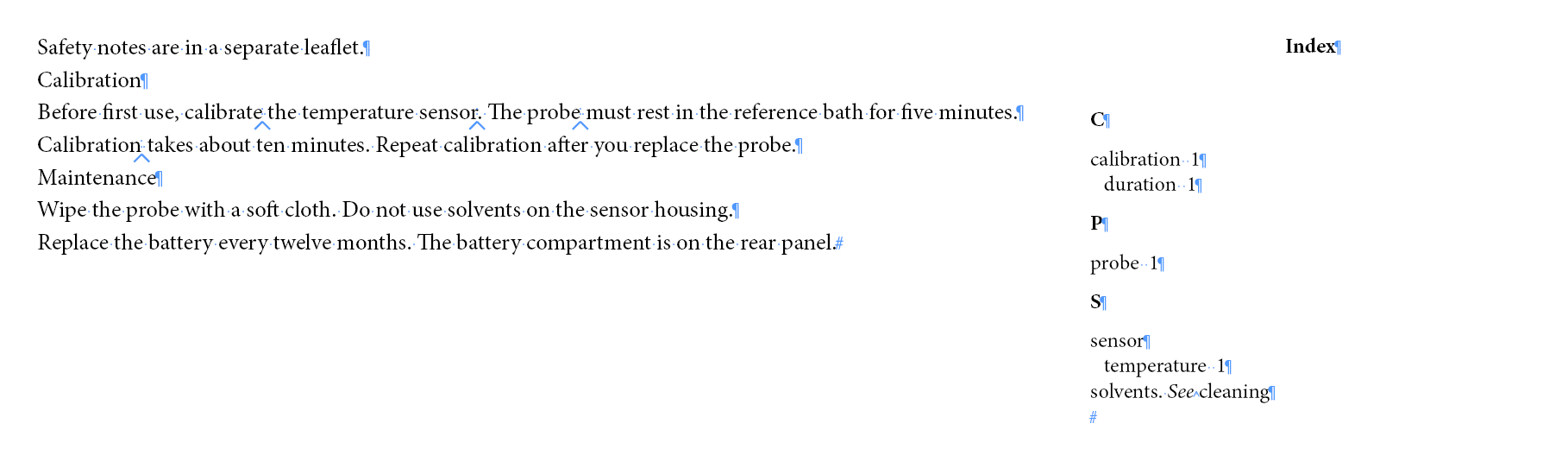
I placed a test file with seven index entries (main entries, subentries, and one "See" reference) in InDesign 2026:
- Preserve Styles and Formatting from Text and Tables: all seven came in. Six became page references and the "See" entry became a cross-reference.
- Remove Styles and Formatting from Text and Tables: none came in. The Index panel was empty and the text had no index markers.
The Index Text checkbox under Include did not change either result. With Preserve Styles, the entries came in even with Index Text turned off. With Remove Styles, they were lost whether it was on or off.
They were also lost in my paste tests: I copied the text from Word 2007 and from LibreOffice Writer and pasted it into InDesign. I did not test a current version of Word.
I can't tell whether Remove Styles is what happened in every case people describe, but it is the cause I could reproduce.
If you haven't edited the text yet
Place the file again with Show Import Options turned on, and choose Preserve Styles and Formatting. After placing, adjust the imported formatting with your InDesign styles.
Adding the entries to the edited document
For each XE field, a Python script records the topic and the text just before and after the field in Word. An InDesign script then looks for that text in the story you select and adds an index marker at the same point.

The InDesign script adds a marker only when the text before and after the entry is found exactly once in that story. An entry at the start or end of a paragraph has text on one side only, so it is never added automatically. Every line in index_entries.txt gets a result in a report. Entries marked CHECK, NOTFOUND, AMBIG, or BADTOPIC need manual review; EXISTS needs nothing. XE fields that the Python script could not read are not in that list; they appear only in its summary.
Before you start:
- Work on a copy of the InDesign document.
- Keep the original .docx. The scripts read it but do not change it.
Step 1: list the entries in the Word file
You need Python 3. To check, open Command Prompt or PowerShell and type python --version. If it isn't installed, get it from python.org.
- Save the code below as
extract_xe.pyin the same folder as your .docx. - Open Command Prompt or PowerShell in that folder. In File Explorer, you can type
cmdin the address bar and press Enter. - Run this, using your file name in place of
manuscript.docx:
python extract_xe.py manuscript.docx index_entries.txt
The script writes index_entries.txt in the same folder and prints a summary:
Index entries written: 7
Entries with a short context: 1
Entries with switches that are not restored: 0
Compare the first number with the number of index entries you expect from the Word file. If the script finds XE fields it can't read, it lists them at the end of the summary. Add those by hand.
"""List the index entries (XE fields) in a .docx with the text around each one.

Usage:  python extract_xe.py manuscript.docx index_entries.txt

Writes a UTF-8, tab-separated file, one entry per line:
  topic (levels separated by ":")  TAB  "See" target  TAB  text before  TAB  text after  TAB  notes
and prints a summary. Only word/document.xml is read, so entries in footnotes,
endnotes, and headers are not listed. Text boxes have not been tested.
"""
import re
import sys
import zipfile
import xml.etree.ElementTree as ET

W = "{http://schemas.openxmlformats.org/wordprocessingml/2006/main}"
BEFORE_CHARS = 40
AFTER_CHARS = 20
SHORT_CONTEXT = 15

XE_RE = re.compile(r'\s*XE\s+"((?:[^"\\]|\\.)*)"(.*)$', re.S)
SEE_RE = re.compile(r'\\t\s+"((?:[^"\\]|\\.)*)"')


def parse_xe(instr):
    """Return (topic, see, switches) or None if the field is not a quoted XE."""
    m = XE_RE.match(instr)
    if not m:
        return None
    topic = m.group(1).replace('\\"', '"')
    rest = m.group(2)
    see = ""
    t = SEE_RE.search(rest)
    if t:
        see = t.group(1).replace('\\"', '"')
        rest = rest.replace(t.group(0), "")
    # \b, \i (bold/italic page number), \r (page range), \f (index type) are not restored
    switches = " ".join(re.findall(r"\\[a-z](?:\s+\S+)?", rest))
    return topic, see, switches


def scan(path):
    root = ET.fromstring(zipfile.ZipFile(path).read("word/document.xml"))
    rows, unparsed = [], []
    for p in root.iter(W + "p"):
        text, pending = "", []
        # One [instruction, showing_result] per open field. Text is visible only when every
        # open field is past its "separate" mark (for example the words of a hyperlink).
        stack = []

        def field_done(instr):
            if not re.match(r"\s*XE\b", instr):
                return
            xe = parse_xe(instr)
            if xe is None:
                unparsed.append(instr.strip())
            else:
                pending.append((xe, len(text)))

        def visible():
            return all(f[1] for f in stack)

        for el in p.iter():
            if el.tag == W + "fldChar":
                kind = el.get(W + "fldCharType")
                if kind == "begin":
                    stack.append(["", False])
                elif kind == "separate" and stack:
                    stack[-1][1] = True
                elif kind == "end" and stack:
                    field_done(stack.pop()[0])
            elif el.tag == W + "instrText" and stack and not stack[-1][1]:
                stack[-1][0] += el.text or ""
            elif el.tag == W + "fldSimple":
                field_done(el.get(W + "instr") or "")
            elif el.tag == W + "t" and visible():
                text += el.text or ""
            elif el.tag == W + "tab" and visible():
                text += "\t"
        for (topic, see, switches), pos in pending:
            before = text[max(0, pos - BEFORE_CHARS):pos]
            if pos > BEFORE_CHARS and " " in before:
                before = before[before.index(" ") + 1:]
            before = before.split("\t")[-1]  # the list itself is tab-separated
            after = text[pos:pos + AFTER_CHARS]
            if len(text) > pos + AFTER_CHARS and " " in after:
                after = after[:after.rindex(" ")]
            after = after.split("\t")[0]
            notes = [switches] if switches else []
            if len(before) < SHORT_CONTEXT:
                notes.append("short context")
            rows.append((topic, see, before, after, " ".join(notes)))
    return rows, unparsed


if __name__ == "__main__":
    if len(sys.argv) != 3:
        sys.exit("Usage: python extract_xe.py manuscript.docx index_entries.txt")
    rows, unparsed = scan(sys.argv[1])
    with open(sys.argv[2], "w", encoding="utf-8", newline="\n") as f:
        for row in rows:
            f.write("\t".join(row) + "\n")
    print("Index entries written: %d" % len(rows))
    print("Entries with a short context: %d" % sum("short context" in r[4] for r in rows))
    print("Entries with switches that are not restored: %d" % sum(r[4].startswith("\\") for r in rows))
    if unparsed:
        print("XE fields that could not be read: %d" % len(unparsed))
        for u in unparsed:
            print("  " + u)
Each line of index_entries.txt has five columns: the topic, any "See" target, about 40 characters before the field, about 20 characters after it, and notes. Subentries keep Word's form, with levels separated by a colon (sensor:temperature).
The notes column flags two things:
- short context: fewer than 15 characters before the entry, for example after a tab or near the start of a paragraph. A short match may point to the wrong place, so check these entries after the run.
- switches such as
\b(bold page number) or\r(page range). The script adds the entry but not the formatting or the range.
Step 2: add the entries in InDesign
- Choose Window > Utilities > Scripts.
- In the Scripts panel, right-click the User folder and choose Reveal in Explorer (Windows) or Reveal in Finder (macOS).
- Save the code below in that folder as a plain-text file named
RestoreWordIndex.jsx. On Windows, make sure the name doesn't end in.txt. - In your document, select a text frame that holds the placed Word text. If the text runs through linked frames, any one of them will do. If the Word file was placed as several separate stories, run the script once for each.
- Double-click the script in the Scripts panel. It shows the first words of the story you selected and asks you to confirm. Compare them with the beginning of the story, which may be in an earlier linked frame. If you can't tell which story it is, click Cancel. Otherwise click OK and choose
index_entries.txt.
The script searches only that story, not footnotes or parent pages. It changes the Find/Change settings while it runs and puts them back at the end. In my test, one Undo removed all the markers it added.
// RestoreWordIndex.jsx
// Re-create Word index entries in one InDesign story from a list made by extract_xe.py.
// Select a text frame of the placed manuscript, run the script, and choose the list.
// An entry is added only where the text before and after it in Word is found exactly once
// in that story. Every line of the list gets a result line in the report.
// The changes to the document are one undo step.
(function () {

    var MARKER = 0xFEFF;

    function readLines(f) {
        f.encoding = "UTF-8";
        if (!f.open("r")) throw new Error("Cannot open " + f.fsName);
        var lines = [];
        try {
            while (!f.eof) {
                var s = f.readln().replace(/\r$/, "");
                if (s.length) lines.push(s);
            }
        } finally { f.close(); }
        return lines;
    }

    // Split a Word topic on unescaped colons. Returns null if a level is empty.
    function levelsOf(path) {
        var parts = [], cur = "";
        for (var i = 0; i < path.length; i++) {
            var ch = path.charAt(i);
            if (ch === "\\" && path.charAt(i + 1) === ":") { cur += ":"; i++; }
            else if (ch === ":") { parts.push(cur); cur = ""; }
            else cur += ch;
        }
        parts.push(cur);
        for (var j = 0; j < parts.length; j++) {
            parts[j] = parts[j].replace(/^\s+|\s+$/g, "");
            if (!parts[j].length) return null;
        }
        return parts;
    }

    function findTopic(index, levels, create) {
        var t = index;
        for (var i = 0; i < levels.length; i++) {
            var next = t.topics.itemByName(levels[i]);
            if (!next.isValid) {
                if (!create) return null;
                next = t.topics.add(levels[i]);
            }
            t = next;
        }
        return t;
    }

    function pathOf(topic) {
        var names = [];
        while (topic && topic.constructor.name === "Topic") { names.unshift(topic.name); topic = topic.parent; }
        return names.join(String.fromCharCode(1));
    }

    function findIn(story, text) {
        app.findTextPreferences = NothingEnum.NOTHING;
        app.findTextPreferences.findWhat = text.replace(/\^/g, "^^");
        return story.findText();
    }

    // Character index in the story after `count` characters of the match, skipping index markers.
    function positionAfter(hit, count) {
        var s = hit.contents, k = 0, n = 0;
        while (n < count && k < s.length) { if (s.charCodeAt(k) !== MARKER) n++; k++; }
        return hit.insertionPoints[0].index + k;
    }

    // True if the topic already has a marker at pos (or in a run of markers starting there).
    function hasMarker(topic, story, pos) {
        if (!topic) return false;
        var text = story.contents;
        for (var j = 0; j < topic.pageReferences.length; j++) {
            var m = topic.pageReferences[j].sourceText;
            if (m.parentStory.id !== story.id || m.index < pos) continue;
            var between = text.substring(pos, m.index), only = true;
            for (var k = 0; k < between.length; k++) if (between.charCodeAt(k) !== MARKER) only = false;
            if (only) return true;
        }
        return false;
    }

    function pageOf(story, pos) {
        try { return "p." + story.insertionPoints[pos].parentTextFrames[0].parentPage.name; }
        catch (e) { return "overset or pasteboard"; }
    }

    function restore(doc, story, entries) {
        var index = doc.indexes.length ? doc.indexes[0] : doc.indexes.add();
        var lines = [], todo = [], planned = {};
        var n = { placed: 0, candidate: 0, skipped: 0, see: 0, exists: 0 };

        for (var i = 0; i < entries.length; i++) {
            var c = entries[i].split("\t");
            var raw = c[0], see = c[1] || "", before = c[2] || "", after = c[3] || "", notes = c[4] || "";
            var levels = levelsOf(raw);
            var label = raw + (notes ? " [" + notes + "]" : "");
            if (!levels) { n.skipped++; lines.push("BADTOPIC  " + label); continue; }

            if (see) {
                var target = see.replace(/^(see also|see)\s+/i, "");
                var tLevels = levelsOf(target);
                if (!tLevels) { n.skipped++; lines.push("BADTOPIC  " + label + " -> " + see); continue; }
                var type = /^see also/i.test(see) ? CrossReferenceType.SEE_ALSO : CrossReferenceType.SEE;
                var from = findTopic(index, levels, true), to = findTopic(index, tLevels, true), dup = false;
                for (var x = 0; x < from.crossReferences.length; x++) {
                    var cr = from.crossReferences[x];
                    if (cr.crossReferenceType === type && pathOf(cr.referencedTopic) === pathOf(to)) dup = true;
                }
                if (dup) { n.exists++; lines.push("EXISTS    " + label + " -> " + target); }
                else { from.crossReferences.add(to, type); n.see++; lines.push("SEE       " + label + " -> " + target); }
                continue;
            }

            var where = "  after \"" + before + "\" / before \"" + after + "\"";
            if (!before.length || !after.length) {
                // The entry is at the start or end of a paragraph: one side is unknown, so do not insert.
                var known = before + after, partial = known.length ? findIn(story, known) : [];
                if (partial.length === 1) {
                    n.candidate++;
                    lines.push("CHECK     " + label + "  (candidate on " +
                        pageOf(story, positionAfter(partial[0], before.length)) + ", only the text " +
                        (before.length ? "before" : "after") + " the entry is known)" + where);
                } else {
                    n.skipped++;
                    lines.push((partial.length ? "AMBIG(" + partial.length + ")  " : "NOTFOUND  ") + label + where);
                }
                continue;
            }
            var hits = findIn(story, before + after);
            if (hits.length === 1) {
                var pos = positionAfter(hits[0], before.length);
                var key = story.id + ":" + pos + ":" + levels.join("\u0001");
                if (planned[key] || hasMarker(findTopic(index, levels, false), story, pos)) {
                    n.exists++; lines.push("EXISTS    " + label + where);
                    continue;
                }
                planned[key] = true;
                todo.push({ at: pos, levels: levels });
                n.placed++;
                lines.push("PLACED    " + label + "  (" + pageOf(story, pos) + ")" + where);
            } else if (hits.length > 1) {
                n.skipped++; lines.push("AMBIG(" + hits.length + ")  " + label + where);
            } else {
                // Only the text before the entry still matches: report it, do not insert.
                var part = findIn(story, before);
                if (part.length === 1) {
                    n.candidate++;
                    lines.push("CHECK     " + label + "  (candidate on " + pageOf(story, positionAfter(part[0], before.length)) +
                        ", the text before and after did not match together; the text before matched once)" + where);
                } else {
                    n.skipped++; lines.push("NOTFOUND  " + label + where);
                }
            }
        }
        // Insert from the end of the story so earlier positions do not move.
        todo.sort(function (a, b) { return b.at - a.at; });
        for (var j = 0; j < todo.length; j++) {
            findTopic(index, todo[j].levels, true).pageReferences.add(story.insertionPoints[todo[j].at], PageReferenceType.CURRENT_PAGE);
        }
        return { n: n, lines: lines };
    }

    // Save the Find/Change settings, run fn, and put the settings back.
    // If the settings cannot be saved, nothing is changed and an error is thrown.
    function withFindSettings(fn) {
        var prefs = app.findTextPreferences.properties;
        var opts = app.findChangeTextOptions.properties;
        var warn = [];
        try {
            var o = app.findChangeTextOptions;
            o.caseSensitive = true; o.wholeWord = false; o.includeFootnotes = false;
            o.includeMasterPages = false; o.includeHiddenLayers = true;
            o.includeLockedLayersForFind = true; o.includeLockedStoriesForFind = true;
            return fn();
        } finally {
            app.findTextPreferences = NothingEnum.NOTHING;
            try { app.findTextPreferences.properties = prefs; } catch (e) { warn.push("Find Text settings"); }
            try { app.findChangeTextOptions.properties = opts; } catch (e) { warn.push("search options"); }
            if (warn.length) alert("Could not restore your " + warn.join(" and ") + ". Check the Find/Change dialog.");
        }
    }

    function run(doc, story, listFile) {
        var entries = readLines(listFile);
        var result;
        app.doScript(function () {
            result = withFindSettings(function () { return restore(doc, story, entries); });
        }, ScriptLanguage.JAVASCRIPT, undefined, UndoModes.ENTIRE_SCRIPT, "Restore Word Index");
        var n = result.n;
        var head = ["Entries in list: " + entries.length,
            "Placed: " + n.placed, "Check (not placed): " + n.candidate, "Not placed: " + n.skipped,
            "See references added: " + n.see, "Already present: " + n.exists, ""];
        var out = File(listFile.fsName.replace(/(\.[^.\\\/]*)?$/, "_report.txt"));
        out.encoding = "UTF-8";
        var written = false;
        try {
            if (out.open("w")) {
                try { written = out.write(head.concat(result.lines).join("\n")); }
                finally { if (!out.close()) written = false; }
            }
        } catch (e) { written = false; }
        return { n: n, report: out, written: written };
    }

    function selectedStory() {
        if (!app.documents.length || !app.selection.length) return null;
        var s = app.selection[0];
        try {
            if (s.constructor.name === "TextFrame") return s.parentStory;
            if (s.hasOwnProperty("parentStory")) return s.parentStory;
        } catch (e) {}
        return null;
    }

    var story = selectedStory();
    if (!story) { alert("Select a text frame of the placed Word text, then run the script again."); return; }
    var start = story.contents.split(String.fromCharCode(MARKER)).join("").replace(/\s+/g, " ").substr(0, 80);
    if (!confirm("Index entries will be added to the story that starts with:\n\n\"" + start +
        "\"\n\nLinked frames are one story. Continue?")) return;
    var f = File.openDialog("Choose the index entry list made by extract_xe.py");
    if (!f) return;
    var r = run(app.activeDocument, story, f);
    alert("Placed: " + r.n.placed + "\nCheck (not placed): " + r.n.candidate + "\nNot placed: " + r.n.skipped +
        "\nSee references added: " + r.n.see + "\nAlready present: " + r.n.exists +
        (r.written ? "\n\nDetails: " + r.report.fsName : "\n\nThe report could not be written to " + r.report.fsName));
})();
After the run
The script writes index_entries_report.txt in the same folder as the list and shows its location. Each line starts with one of these:
PLACED: the text before and after the entry was found once in the story, and a marker was added. The page is shown.CHECK: no marker was added. Either the text before and after did not match together but the text before matched once, or the entry is at the start or end of a paragraph and the text on its one side matched once. The line shows the candidate page. Compare it with the Word file and add the entry by hand if it belongs there.NOTFOUND: no usable match. Find the entry in the Word file and add it by hand.AMBIG(n): the text appears n times. Add the entry by hand.SEE: a See or See also cross-reference was added.EXISTS: the script found a marker for the same topic at that point, or the same cross-reference, and did not add another.BADTOPIC: the topic has an empty level, so nothing was added.
Then check the result:
- Go through every
PLACEDline and look at the marker in the text, starting with the ones marked short context. Turn on Type > Show Hidden Characters to see the markers. - Add the
CHECK,NOTFOUND,AMBIG, andBADTOPICentries by hand, and fix the formatting or page range of entries noted with switches. - Open the Index panel and compare the topics with the Word file, including See references.
- Generate the index and compare its page numbers with the layout.
In my test, I rewrote two sentences after placing. One entry became CHECK because the text after it had changed, and one became NOTFOUND because the text before it had changed.
What this does not cover
- Entries in footnotes, endnotes, and headers. The Python script reads only the main text of the .docx, so XE fields there are not listed. I have not tested text boxes.
- Bold or italic page numbers and page ranges. These are noted in the list but not restored.
- A translated InDesign document. Matching the source-language text against a translation is unreliable. I haven't tried it.
What I tested
InDesign 21.5.1 on Windows, with a .docx made in Word 2007 containing seven index entries. I placed it both ways, with Index Text on and off, and also pasted it in. In the placed copy I added a paragraph at the start and rewrote two sentences. I also put the old sentences in a separate text frame, and the script did not add markers there. I checked the position of every marker, generated the index, undid the run, ran the script twice (the second run added nothing), and ran a list with a repeated line.
A second test file added these cases: an entry stored in a different field format, a topic containing a colon, an entry right after a tab, a See also reference, entries at the start and end of a paragraph, a paragraph with only an entry, an entry after a hyperlink, an entry inside a hyperlink, and an XE field without quotation marks. I did not test entries inside tables.