InDesign GREP Styles for Russian Quotes: The Limits with Polish
This article is also available as a short video on YouTube: InDesign GREP Style: Set the Language of Russian Quotes Automatically
An English book may contain hundreds of Russian and Polish quotes. Each one should carry its own language, but applying a character style to each passage by hand takes a long time.
For Russian, a GREP style in the body paragraph style can do it automatically, including quotes added later. For Polish, a GREP style catches only some of the words. This article shows how many in my test and what to do about the rest.
What the language setting changes
InDesign uses the language of each character to pick the hyphenation and spelling dictionaries, and the shape of typographer's quotes. I compared an English paragraph with and without a GREP style that sets Russian.
| English only | With the GREP style | |
|---|---|---|
| Hyphenation in a 90 pt column | The Russian words were not hyphenated. They did not fit, and the rest of the text went overset. | досто / примечатель / ность, гостепри / имство |
| Dynamic Spelling | Both Russian test words were underlined. | Only the misspelled one was underlined. |
Typing " between Война and и, with Typographer's Quotes on |
“ | « |
The slashes mark where the lines ended. With the Russian GREP style already applied, adding the Polish one changed the break in nieprzemakalności from nieprzemakalnoś / ci to nieprzemakalno / ści.
I did not test typing a quote before the first Cyrillic letter, which is where an opening quote usually goes.
Without either language GREP style, the exported tagged PDF contained only en-US. With both the Russian and the Polish GREP styles applied, it contained en-US, ru, and pl. Screen readers can use language information to choose pronunciation. I did not check which passage each entry belonged to, and I did not test a screen reader.

Russian: one GREP style
Cyrillic letters have their own Unicode range, so a GREP expression can find them without touching the English around them. If all the Cyrillic text in your book is Russian, this sets it to Russian automatically.
- Create a character style, for example
Lang RU. In Advanced Character Formats, set Language to Russian. Check that the style sets nothing else, including settings inherited from a Based On style. - Open the body text paragraph style, go to GREP Style, and click New GREP Style.
- Set Apply Style to
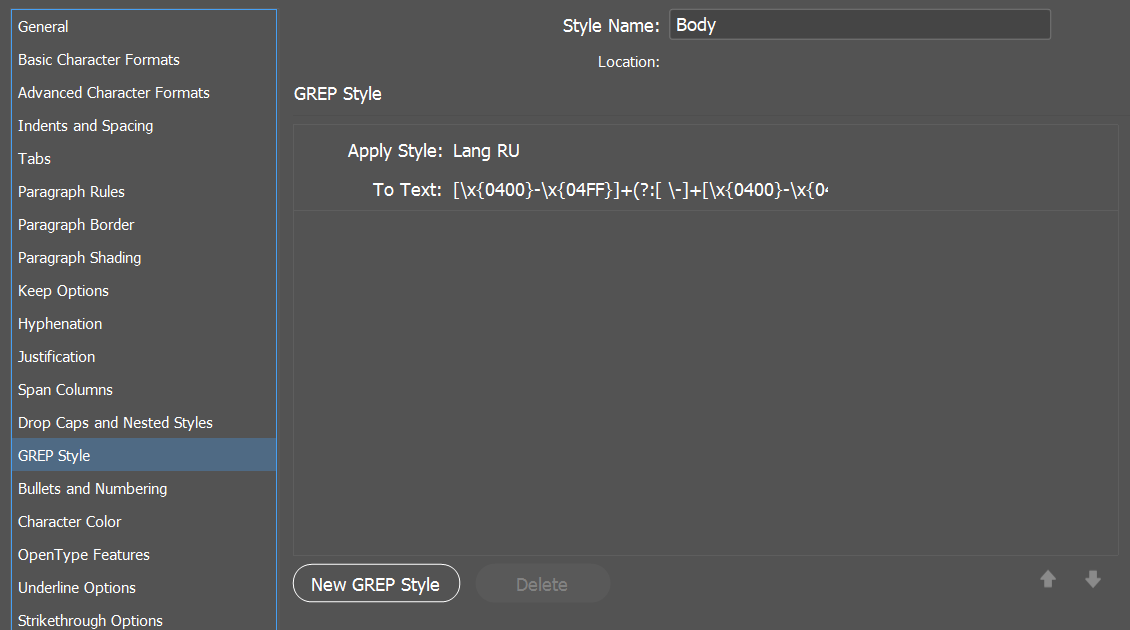
Lang RU, and set To Text to:
[\x{0400}-\x{04FF}]+(?:[ \-]+[\x{0400}-\x{04FF}]+)*
- Click OK. Add the same GREP style to every paragraph style that can contain Russian, such as captions, notes, or block quotes.
The expression matches a run of Cyrillic letters, and keeps going across spaces and hyphens when the next word is also Cyrillic. In my test text it matched:
Война и мирas one runру-руas one runОн сказалandнетseparately, because an em dash stood between them- only
овinDoctorов
Commas, dashes, digits, and guillemets stay outside the match. Hyphenation and Dynamic Spelling still worked for the Russian words I tested. The combining acute accent U+0301, used as a stress mark, falls outside this range, so the expression can split a word that contains it into separate matches. I did not test text with combining stress marks.
A GREP style works on the text as it is now and on text you add later. A Find/Change that applies Lang RU once does the same job for the current text, but a quote added next week will stay English.
Polish: letters are not enough
Polish uses the Latin alphabet plus nine more letters: ą ć ę ł ń ó ś ź ż. They help find some Polish words, but they do not identify the language. ó is also used in other languages, and an English sentence that mentions Kraków contains ó too. A second GREP style can catch words that contain one of these letters:
\w*[ąćęłńóśźżĄĆĘŁŃÓŚŹŻ]\w*
Set it to apply a Lang PL character style. In my samples, most Polish words had none of these letters. I counted the words by script:
| Sample | Words containing one of the nine letters |
|---|---|
| Pan Tadeusz, first 10 lines | 25 of 70 (36%) |
| Eight short phrases (Na zdrowie, Dzień dobry, To jest dobre ...) | 3 of 17 (18%) |
In the screenshot above, piękność is no longer underlined, but dobre and zdrowie are, because InDesign checks them against the English dictionary.
How you handle the remaining Polish text depends on the manuscript.
- A whole paragraph in Polish. Give block quotes their own paragraph style with Language set to Polish. No GREP style is needed.
- Polish marked in the Word file. In an earlier test with Word 2007 and InDesign 21.5.1, languages set directly on text came in when I placed the file with Remove Styles and Formatting and Preserve Local Overrides checked. After I applied an InDesign paragraph style, a language on part of a paragraph stayed, but a language covering the whole paragraph was removed. That test used Turkish, Greek, and French. Before you place the whole manuscript, place a short Polish sample with those import options, apply your paragraph style, and check the language.
- Polish not marked. Check Spelling can show some of the Polish words that are still English, but it misses any word the English dictionary accepts. When you find a Polish passage, apply
Lang PLto the whole passage, not only the flagged word. With hundreds of unmarked quotes this is the same manual work you wanted to avoid, so ask for the language to be set in the source file, or for a consistent marker around each Polish passage.
Notes
- In my test, a language GREP style and an italic GREP style applied to the same text produced Russian italic text.
- Quote marks are a separate decision. The Russian GREP style changed a quote typed inside the Russian text, but whether an English book uses « » for Russian quotes is a question for its editorial style. Check the quote marks after the text is in.
- If the quote marks for Russian or Polish look wrong, check the Dictionary preferences. Mine were
« »for Russian and„ ”for Polish.
What I tested
InDesign 2026 (21.6) on Windows. Test documents created by script, with Arial. Hyphenation and PDF language entries were read from the document and the exported PDF. Dynamic Spelling and typed quotes were checked on screen. The Polish samples are the first ten lines of Pan Tadeusz (1834) and eight common phrases.