Word Fonts and Languages That Survive "Remove Styles and Formatting" in InDesign
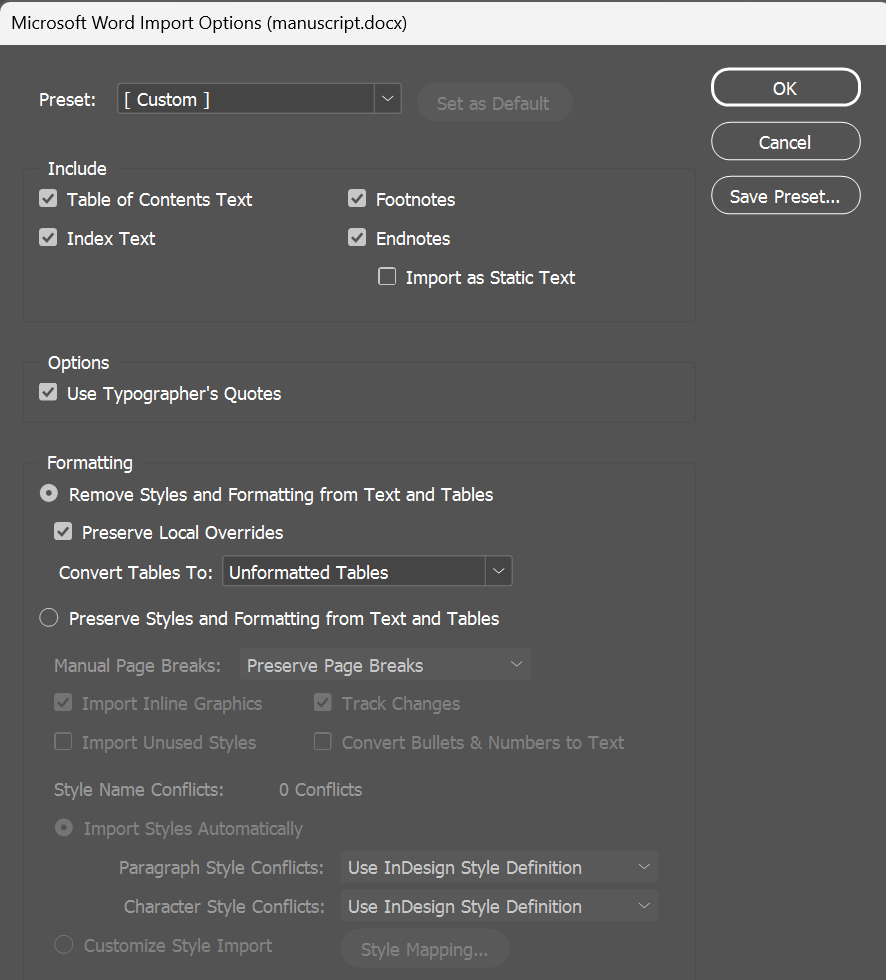
You place a Word manuscript with Remove Styles and Formatting from Text and Tables checked, and Preserve Local Overrides checked so the author's italics and bold come through. You apply your paragraph style. Most paragraphs follow it, but some keep Times New Roman. A few spaces inside italic quotes show a missing font. The Character panel says some words are Turkish or Greek.
A question with these symptoms has had no answers on Graphic Design Stack Exchange since 2024. I can't see that author's file, so I made a controlled test file instead: I wrote the .docx XML with one kind of formatting per paragraph, then opened and saved it in Word 2007. I placed the saved file in InDesign 2026 (21.5.1) on Windows under each import setting.
What came through in my test
Word can store a font or a language in a style, or directly on a stretch of text. With Remove Styles and Preserve Local Overrides both checked, fonts from the Normal style and from paragraph styles were dropped. Fonts set directly on the text, and fonts that came from Word character styles, came in as local overrides.
| In the Word file | Result in my test file |
|---|---|
| Font from the Normal style or a paragraph style | Not imported |
| Main font set directly on text (kept in the file Word saved) | Imported as a local override |
| Font from a Word character style | Imported as a local override; the character style itself was not imported |
| Font set only in the East Asian or complex-script font slot | Not imported |
| Font set only on the paragraph mark | Not imported |
| Main language set directly on text | Imported (Turkish, Greek and French) |
| East Asian language setting only | Not imported |
| Italic, bold, underline | Imported |
With Preserve Local Overrides unchecked, none of these came in, including italic and bold.
Why it looks random
After placing, I applied a paragraph style to every paragraph by clicking it in the Paragraph Styles panel (without holding Alt), which keeps overrides. I also did it by script with applyParagraphStyle(style, false) and got the same result. The imported overrides were handled in two ways:
- An override that covered the whole paragraph was removed. A paragraph that was entirely Calibri took the paragraph style's font. A paragraph that was entirely Turkish became English.
- An override that covered part of the paragraph stayed. One Calibri word in an otherwise plain paragraph stayed Calibri. One Turkish word stayed Turkish.

That could explain a manuscript where some paragraphs follow the style and others don't, but I have not examined the file from the question.
Check fully italic paragraphs. The same thing happened to italic. A paragraph that was italic from start to finish lost its italic when the paragraph style was applied, while a paragraph with a few italic words kept them. The script later in this post does not bring that italic back, so check italic block quotes right after applying styles.
The Arial Unicode MS space
Word can give a single space its own font. In my test file, one space between two italic words had Arial Unicode MS set directly on it. It came into InDesign as Arial Unicode MS Regular, even though the space was italic in Word, and it stayed that way after the paragraph style was applied because it covered only part of the paragraph. A space set in a font that wasn't installed also came in with that font name.
When I set the same font only in Word's East Asian or complex-script font slot, it did not come into InDesign.
Fixing a document you have already placed
Clearing all overrides removes the imported fonts and languages, but it also removes the remaining italics and bold. What worked in my test was setting each font family and language that differed from the paragraph style back to the paragraph style's value, while keeping the font style name.
After that, the text followed the paragraph style again. When I changed the style from Verdana to Tahoma and from English: USA to English: UK, the corrected text changed with it.
To list the fonts used in the document, open Type > Find Font.
For languages alone, Find/Change can do it: leave Find what and Change to empty, set Find Format to the language you want to remove (for example Turkish) and Change Format to your paragraph style's language. Repeat for each language. In my test, the changed words followed later changes to the style.
For fonts, I used the script below. Read what it does before running it:
- It works on the whole story of the selected text frame, including text you did not select. It does not process tables, footnotes or anchored frames.
- It can't tell unwanted formatting from intentional formatting. Every font family or language that differs from the paragraph style is set back, unless an InDesign character style applied to that text specifies that font family or language. A symbol font, a passage in another script, or a quotation that should stay French will be changed otherwise. Before running it, apply an InDesign character style that specifies the font family or language you need to keep. A character style that only sets Italic does not protect the font. Word character styles don't help here, because they are not imported.
- It preserves the current font style name when changing font families. It looks for a style with the same name (Italic, Bold) in the paragraph style's font family. If there isn't one, it leaves that font as it is and lists it; the language can still change. It does not restore italic that is already gone: in my test, the Arial Unicode MS space became Verdana Regular, not Verdana Italic.
- It skips entire paragraphs that have nested styles, line styles, GREP styles or a drop cap character style. Unrelated font and language differences in those paragraphs are left unchanged too. The summary shows how many paragraphs were skipped.
// ResetImportedFonts.jsx
// Works on the whole story of the selected text frame (main story text only;
// tables, footnotes and anchored frames are not processed).
// Wherever a run's font family or language differs from its paragraph style, it sets that
// attribute back to the paragraph style's value. When it changes the font family, it keeps
// the run's current font style name (Italic, Bold, ...). It does not restore italics that
// are already gone.
// Font changes are skipped if no installed font matches the target family and current
// font style name; the language may still change.
// Skipped: attributes set by an applied character style (including its Based On chain),
// and whole paragraphs with nested, line or GREP styles, or a drop cap character style.
// Shows a summary first. One Undo reverts a completed run.

(function () {
  if (app.documents.length === 0 || app.selection.length !== 1 || !app.selection[0].hasOwnProperty("parentStory")) {
    alert("Select one text frame (or click in its text) first.");
    return;
  }
  var story = app.selection[0].parentStory;
  var doc = story.parent;
  while (doc.constructor.name !== "Document") doc = doc.parent;
  var noneStyle = doc.characterStyles.itemByName("$ID/[None]");

  function famOf(f) {
    try { if (f && f.hasOwnProperty("fontFamily")) return f.fontFamily; } catch (e) {}
    return String(f).split("\t")[0];
  }
  function isNone(cs) {
    try { return !cs || !cs.hasOwnProperty("id") || cs.id === noneStyle.id; } catch (e) { return false; }
  }
  // "no" = nothing in the character style chain sets this attribute; "yes" = it does;
  // "unknown" = it could not be read (treated like "yes": the attribute is not changed).
  function styleSets(cs, prop) {
    for (var guard = 0; guard < 20 && !isNone(cs); guard++) {
      try {
        var v = cs[prop];
        if (v !== "" && v !== NothingEnum.NOTHING && v !== null) return "yes";
        cs = cs.basedOn;
      } catch (e) { return "unknown"; }
    }
    return isNone(cs) ? "no" : "unknown";
  }
  function hasAutoStyles(p) {
    try {
      if (p.nestedStyles.length || p.nestedLineStyles.length || p.nestedGrepStyles.length) return true;
      if (p.dropCapCharacters > 0 && !isNone(p.dropCapStyle)) return true;
      return false;
    } catch (e) { return true; }
  }
  function add(o, k) { o[k] = (o[k] || 0) + 1; }

  var jobs = [], fontCount = {}, langCount = {}, skipped = {};
  var paras = story.paragraphs.everyItem().getElements();
  for (var i = 0; i < paras.length; i++) {
    var p = paras[i];
    var pStart = p.index, pEnd = p.index + p.length - 1;
    var ps, pFont, pFam, pLang;
    try { ps = p.appliedParagraphStyle; pFont = ps.appliedFont; pFam = famOf(pFont); pLang = ps.appliedLanguage; }
    catch (e) { add(skipped, "paragraph style could not be read"); continue; }
    if (hasAutoStyles(p)) { add(skipped, "paragraph with nested / line / GREP styles or a drop cap style (not checked)"); continue; }
    var runs = p.textStyleRanges.everyItem().getElements();
    for (var j = 0; j < runs.length; j++) {
      var r = runs[j], cs = r.appliedCharacterStyle;
      var a = Math.max(r.index, pStart), b = Math.min(r.index + r.length - 1, pEnd);
      if (b < a) continue;
      var job = { a: a, b: b, fam: null, lang: null };
      var rFam = famOf(r.appliedFont);
      if (rFam !== pFam) {
        var sf = styleSets(cs, "appliedFont");
        if (sf === "yes") add(skipped, "font set by a character style: " + rFam);
        else if (sf === "unknown") add(skipped, "character style chain could not be checked (font left as is): " + rFam);
        else {
          var target = app.fonts.itemByName(pFam + "\t" + String(r.fontStyle));
          var ok = false;
          try { ok = target.isValid && target.status === FontStatus.INSTALLED; } catch (e) {}
          if (ok) { job.fam = target; add(fontCount, rFam); }
          else add(skipped, "no installed " + pFam + " " + r.fontStyle + " (font left as is): " + rFam);
        }
      }
      var rLang = r.appliedLanguage.name;
      if (rLang !== pLang.name) {
        var sl = styleSets(cs, "appliedLanguage");
        if (sl === "no") { job.lang = pLang; add(langCount, rLang); }
        else add(skipped, "language set by a character style or not readable: " + rLang);
      }
      if (job.fam || job.lang) jobs.push(job);
    }
  }

  function list(o) { var s = []; for (var k in o) s.push("  " + k + " (" + o[k] + ")"); return s.join("\n"); }
  var skipText = list(skipped) ? "\n\nNot changed:\n" + list(skipped) : "";
  if (jobs.length === 0) {
    alert("No eligible changes were found in this story." + skipText);
    return;
  }
  var msg = "This changes the whole story of the selected frame, not only selected words.\n\n" +
    "Set back to the paragraph style:\n\nFonts:\n" + (list(fontCount) || "  (none)") +
    "\n\nLanguages:\n" + (list(langCount) || "  (none)") + skipText + "\n\nContinue?";
  if (!confirm(msg)) return;

  var done = 0;
  try {
    app.doScript(function () {
      for (var k = jobs.length - 1; k >= 0; k--) {
        var t = story.characters.itemByRange(jobs[k].a, jobs[k].b);
        if (jobs[k].fam) t.appliedFont = jobs[k].fam;
        if (jobs[k].lang) t.appliedLanguage = jobs[k].lang;
        done++;
      }
    }, ScriptLanguage.JAVASCRIPT, undefined, UndoModes.ENTIRE_SCRIPT, "Reset imported fonts");
  } catch (e) {
    alert("Stopped after completing " + done + " of " + jobs.length + " text ranges: " + e +
      "\nThe current range may also have been partly changed, and earlier ranges may already have been changed." +
      "\nCheck the document against the copy you saved before running the script.");
    return;
  }
  alert("Done. " + done + " text ranges changed. Press Ctrl+Z once to revert.");
})();
To run it on Windows:
- Save a copy of the InDesign document.
- Open Window > Utilities > Scripts. In the Scripts panel, right-click the User folder and choose Reveal in Explorer.
- Paste the code into a plain text editor such as Notepad and save it in that folder as
ResetImportedFonts.jsx. Make sure the name doesn't end in.txt. - Apply your paragraph styles. For any text that should keep a different font or language, apply a character style that specifies that font family or language.
- With the Selection tool, select one text frame of the story.
- Double-click the script in the Scripts panel. Read the summary, then click OK, or Cancel to stop without changes.
- Check italic quotes, symbols and other languages. To revert, press Ctrl+Z once right away.
What to ask the author
Use these two steps only if the manuscript should be in one language and one font family. If some passages need a different language or font, these steps will overwrite them too.
In my test (Word 2007), both steps removed the settings from the saved file:
- Languages: select all text, then set the language to English (United States). After saving, the per-word languages were gone from the file.
- Fonts: select all text and choose the font the Normal style already uses. After saving, the directly applied fonts, including the Arial Unicode MS space, were gone from the file. The two words that had a Word character style got that font applied directly instead.
The italic, bold and underlined text was the same before and after both steps.
What I tested
Besides the Word test file, I ran the script on a story built in InDesign with an override that crossed a paragraph boundary, character styles that set a font through Based On or set a language, a GREP style, a drop cap style, a table and a footnote.
I did not test a current version of Word, macOS, files from other word processors, or a real client manuscript.