A Rule-First Approach to AI-Assisted Terminology QA
Updated September 18, 2026
Terminology errors are rarely dramatic.
They usually appear as small inconsistencies: one deprecated term, one preferred phrase that was missed, one verbose expression that should have been simplified, or one word that does not match the approved glossary.
In technical documentation, these small issues matter. They affect consistency, readability, translation quality, and sometimes even product safety.
The problem is that terminology checks are repetitive. They are also easy to miss when reviewing long documents manually.
That makes terminology QA a good candidate for automation.
But there is an important design question:
Should AI be the first checker?
My answer is: usually, no.
For production-oriented QA, terminology checking should start with explicit rules. AI should be used as a second-pass confirmation layer, not as the primary source of detection.
This is the design idea behind a small terminology checker I recently built and published on GitHub. The repository is available here: Terminology Checker.
The Problem with Manual Terminology Checks
A terminology rule often looks simple.
For example:
- Use “use” instead of “utilize”
- Use “before” instead of “prior to”
- Use “because” instead of “due to the fact that”
- Avoid inconsistent product names
- Avoid deprecated technical terms
In theory, these rules are easy to check.
In practice, they become difficult for several reasons.
First, documents are long. Even if a reviewer knows the correct terminology, checking every occurrence manually is slow and unreliable.
Second, terminology rules are often scattered. Some rules live in a glossary, some in a style guide, some in a client-specific instruction file, and some only exist as reviewer experience.
Third, final deliverables are not always checked in the same environment where translation was performed. A document may pass QA in a CAT tool, but still need to be checked again after layout, PDF generation, or DOCX formatting.
This is especially common in multilingual production workflows.
A CAT tool can check the translation environment.
But the final PDF or DOCX is what the client actually receives.
That gap is where lightweight QA tools can help.
Why AI Should Not Be the First Checker
It is tempting to ask AI a simple question:
“Please check this document for terminology errors.”
For a short document, this may work well enough.
For production QA, however, this approach has several weaknesses.
-
Lack of repeatability
The same input may not always produce the same output. This makes it difficult to use AI-only checking as a stable QA process. -
Unclear rule traceability
It may be hard to tell which glossary entry, style rule, or client instruction caused a finding. -
Over-detection and under-detection
AI may over-interpret harmless phrases, while also missing simple rule violations that a deterministic search would catch. -
Difficult review history
If the finding is not tied to an explicit rule, it becomes harder to review, compare, or improve the result later. -
Unclear cost and scope
Sending entire documents to AI for open-ended checking can be inefficient, especially when many issues can be detected by simple rules.
This matters because QA needs repeatability.
A terminology checker should answer basic questions clearly:
- Which rule was checked?
- Which term was found?
- Where was it found?
- What is the suggested replacement?
- Was the finding confirmed or rejected?
- Can the result be reviewed later?
If AI is used as the first checker, these questions become harder to control.
For this reason, I prefer a rule-first approach.
The rules should find candidates first.
AI can then help confirm whether each candidate is actually a problem in context.
A Two-Pass Approach
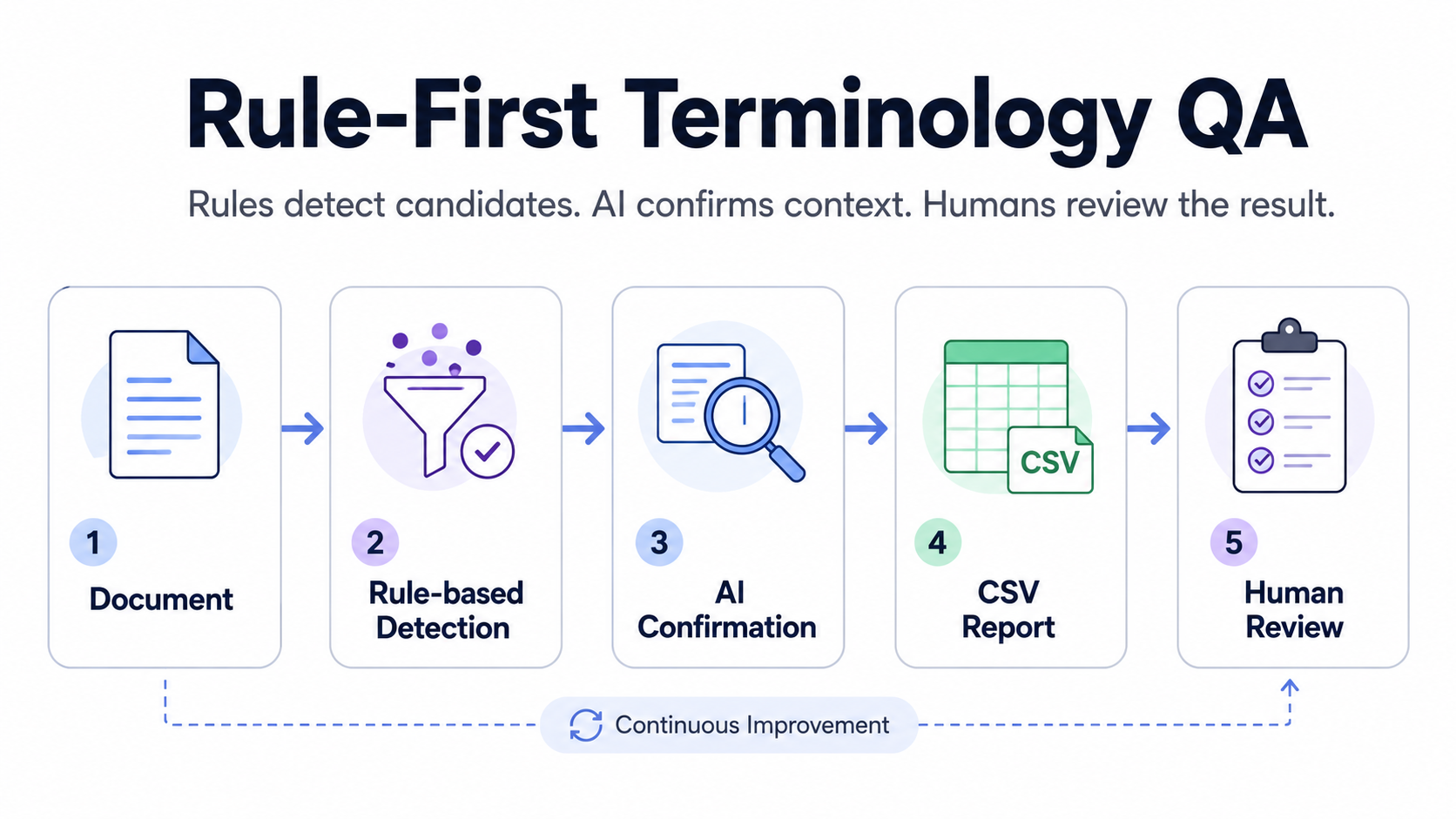
Document
  ↓
Rule-based candidate detection
  ↓
AI-based confirmation
  ↓
CSV report
The first pass is rule-based.
The tool reads a glossary file and searches the document for defined terms or phrases. This step is deterministic. If the same document and the same glossary are used, the same candidates should be detected.
The second pass is AI-assisted.
After the rule-based pass finds candidates, AI can review the surrounding context and help reduce false positives.
This separation is important.
The rule layer provides repeatability.
The AI layer provides context sensitivity.
The report layer keeps the result reviewable.
That combination is more practical than relying on AI alone.
A Simple Example
Suppose a glossary contains this rule:
wrong_term,correct_term,notes
utilize,use,Use plain English where possible
A rule-based checker can easily find every occurrence of “utilize.”
But not every occurrence has the same priority.
For example:
We will utilize this tool to check the document.In this case, the preferred wording is probably:
We will use this tool to check the document.The rule-based layer can detect the candidate.
The AI confirmation layer can then check the surrounding sentence and confirm that this is likely a real style issue.
Now consider a different case:
The report discusses asset utilization in manufacturing environments.A simple search may still detect a related term pattern, depending on the glossary rule. But the surrounding context may show that this is part of a technical expression, not a simple “utilize → use” replacement.
This is where AI can be useful.
Not as a magic checker.
Not as the source of truth.
But as a context filter.
The goal is to reduce the number of items that a human reviewer needs to inspect manually.
What This Terminology Checker Does
The tool is a small web app and command-line utility for terminology QA.
It can check:
- PDF files
- DOCX files
- TXT files
It uses a CSV glossary with entries such as:
wrong_term,correct_term,notes
utilize,use,Use plain English
prior to,before,Simplify the phrase
due to the fact that,because,Avoid verbose expressions
The tool extracts text from the document, checks it against the glossary, and generates a CSV report.
The report can then be reviewed by a human.
This is intentional. The tool does not automatically rewrite the document. It focuses on detection, confirmation, and reporting.
In QA workflows, that distinction matters.
Automatic fixing may be useful in some controlled cases, but terminology QA often requires human judgment. The goal is not to remove the reviewer. The goal is to reduce repetitive checking and make possible issues easier to review.
Web UI and CLI
The tool includes a simple web interface built with Gradio.
The web UI is useful when the goal is quick checking:
- Upload a document
- Upload a glossary CSV
- Run the check
- Download the result report
The tool also supports command-line execution.
This is useful if the checker is later integrated into a more structured workflow, such as:
- project-level QA folders
- repeated checks for the same client
- batch processing
- automated report generation
- local production pipelines
The web UI makes the tool easier to try.
The CLI makes it easier to extend.
Why This Matters in Multilingual Production
Terminology QA is not only a translation issue.
It is also a production issue.
In a multilingual workflow, text may move through several stages:
Source document
  ↓
Translation
  ↓
CAT tool QA
  ↓
Layout / DTP
  ↓
PDF or DOCX output
  ↓
Final review
A terminology issue can appear, disappear, or become harder to detect at different stages.
For example, a term may be correct in the CAT tool but become difficult to verify after layout. A PDF may introduce line breaks or extraction noise. A final DOCX may contain manually edited text that was not checked in the translation environment.
This is why final-document QA matters.
The terminology checker is not meant to replace CAT-tool QA.
It is a final-document QA layer.
It is designed to help check deliverable formats such as PDF, DOCX, and plain text against explicit terminology rules.
That makes it useful as a bridge between translation QA and final production QA.
Rule-Based Detection Is Still Valuable
AI is powerful, but rule-based detection is still extremely useful.
A rule is clear.
A rule is reviewable.
A rule can be versioned.
A rule can be reused across projects.
For example, if a client says that “utilize” should be replaced with “use,” that rule does not need creative interpretation. It should simply be checked.
In such cases, using AI as the first detection layer adds unnecessary uncertainty.
A better design is:
Explicit rule:
“utilize” → “use”

Detection:
Find occurrences of “utilize”

AI confirmation:
Check whether this occurrence is actually a problem in context

Human review:
Accept, reject, or revise
This keeps the workflow understandable.
It also makes the QA result easier to explain to another reviewer, translator, client, or production manager.
AI as a Smart Filter
AI becomes more useful when its role is limited.
Instead of asking AI to invent the checklist, the tool gives AI a narrower task:
This term was found by a rule.
Based on the surrounding context, does it look like a real terminology issue?
This is a better use of AI in QA.
The AI is not replacing the glossary.
It is not replacing the reviewer.
It is not deciding the entire QA policy.
It is only helping with context confirmation.
In other words, AI works best here as a smart filter.
The rule-based layer finds possible issues.
The AI layer helps prioritize them.
The human reviewer makes the final decision.
This role separation makes the workflow easier to trust.
Current Limitations
This is still a small MVP.
There are several limitations.
First, PDF text extraction is not always perfect. If the PDF contains complex layouts, unusual encoding, scanned pages, or broken text order, the extracted text may not reflect the visible page accurately.
Second, AI confirmation requires an external API. This means confidential documents should not be checked with AI confirmation unless the workflow allows it.
For sensitive documents, the rule-based mode is safer because it can be used without sending document text to an external AI service.
Third, the tool does not automatically apply corrections. This is by design. At this stage, the output is a report, not a rewritten document.
Fourth, glossary management is still simple. The current CSV format is easy to understand, but larger workflows may need Excel support, rule categories, severity levels, client profiles, and version control.
These limitations are useful because they clarify the next design step.
Future Direction
The interesting part of this tool is not the web UI itself.
The important part is the structure:
Rules
  ↓
Detection
  ↓
Context confirmation
  ↓
Reviewable report
This structure can become a reusable QA module.
Possible future improvements include:
- Excel glossary support
- batch checking for multiple files
- project-specific rule profiles
- severity levels
- false-positive feedback
- highlighted PDF output
- DOCX comments
- QA history logs
- local AI model support
- integration with other multilingual DTP checks
The long-term goal is not just to build another checker.
The goal is to make terminology QA more structured, repeatable, and easier to connect with other parts of multilingual production.
A terminology checker can become one module in a larger local QA workflow.
For example:
Terminology check
  +
PDF text check
  +
layout issue detection
  +
overset / missing link checks
  +
QA logs
  =
local multilingual production QA layer
That is the direction I am interested in.
Not just one-off automation, but reusable workflow components.
Conclusion
Terminology QA should not depend only on human memory.
It should also not depend entirely on AI judgment.
A more practical approach is to start with explicit rules, detect candidates consistently, then use AI only where context matters.
That is the idea behind this terminology checker.
Rules provide structure.
AI provides context support.
Reports keep the process reviewable.
For multilingual technical documentation, this balance is important.
The goal is not to automate judgment away.
The goal is to make judgment easier to apply consistently.
GitHub:
https://github.com/linguist-coder/terminology-checker