Why TOC Is Hard to Automate in InDesign
InDesign can generate and update a table of contents.
But once you try to build automation around it, things get much less straightforward.
The problem is not TOC generation itself. The problem is reliable identification.
From the scripting side, a TOC often looks like an ordinary text frame. It sits on a page like any other block of text, and at first glance it seems like something you should be able to detect, inspect, and process like normal content.
In practice, that assumption breaks down quickly.
What makes TOC difficult to automate is not that it is impossible to create. InDesign exposes TOC creation through its scripting model. The real issue is that the document model does not give you a practical, explicit frame-level way to say, “This text frame is a TOC.” The UI clearly knows how to update it. The scripting side does not give you the same kind of certainty.
That gap matters more than it may seem.
A TOC looks like normal text, but it does not behave like normal text
Visually, a TOC is just text.
But functionally, it is closer to a generated structure than to hand-authored text. The fact that InDesign can update it already tells us that something more than visible text is involved. There is some internal relationship between the TOC and the document’s heading structure, TOC style, and regeneration logic.
The problem for automation is simple: whatever InDesign uses internally, it is not exposed in a way that makes frame-level detection reliable from the scripting side.
This is where many automation attempts go wrong. What looks simple in the UI is not always simple in the DOM.
There is no simple “is this TOC?” property
This is the practical limitation.
You can create a TOC. You can define TOC styles. But when you scan document stories or text frames, there is no clean, obvious, automation-safe property that tells you, “Yes, this is the TOC frame.”
That means any script that tries to detect TOC by inspection is already operating on weak ground.
You can guess. You can infer. You can build heuristics. But you cannot depend on a robust and explicit TOC flag in the way many automation workflows would ideally require. Even in the UXP era, this remains fundamentally a document-model problem, not just a scripting-engine problem. Adobe clearly supports UXP scripting and provides migration guidance from older platforms, but that does not automatically mean every internal document structure is fully exposed for reliable detection.
And in production, weak detection logic quickly turns into unstable automation.
Why this matters in real production
This is not just a technical inconvenience.
In multilingual DTP workflows, TOC is often one of the most fragile parts of a document. After translation, headings get longer, line breaks change, page flow shifts, and the TOC often needs to be updated. That is already a sensitive moment in the layout process.
Now add automation to that situation.
If your script cannot safely identify which frame is the actual TOC, then every downstream action becomes risky. You may update the wrong content. You may miss the TOC entirely. You may trigger layout changes in a place you did not intend to touch.
And once a TOC expands or reflows, the effect is rarely isolated. In multilingual documents, one TOC change can push text onto the next page, create overset, shift anchored objects, or break carefully balanced page structures.
In other words, TOC is not just a generated list. In production, it is a layout-sensitive object.
That is why the real question is not “Can InDesign update a TOC?”
The real question is “Can this be handled safely inside an automated workflow?”
Why detection-based automation is fragile
A common instinct is to solve this with smarter detection.
For example, a script might assume that a TOC frame:
- uses a specific paragraph style
- appears near the beginning of the document
- contains a predictable title such as “Contents”
- sits on a dedicated page
- includes page numbers in a recognizable pattern
Sometimes this works.
The problem is that it often works only by chance.
And “it works by chance” is one of the most dangerous states in production automation. It creates false confidence. A script appears successful in one template, one language, or one document family, then quietly fails when a different template, language, or editorial variation is introduced.
This is especially risky in multilingual workflows, where layout conventions, naming, language length, and TOC formatting can vary across editions.
If identification is ambiguous, automation becomes a reliability problem.
That is the real turning point: some problems should not be solved by increasingly clever detection logic. They should be solved by document design.
A better approach: design for identification
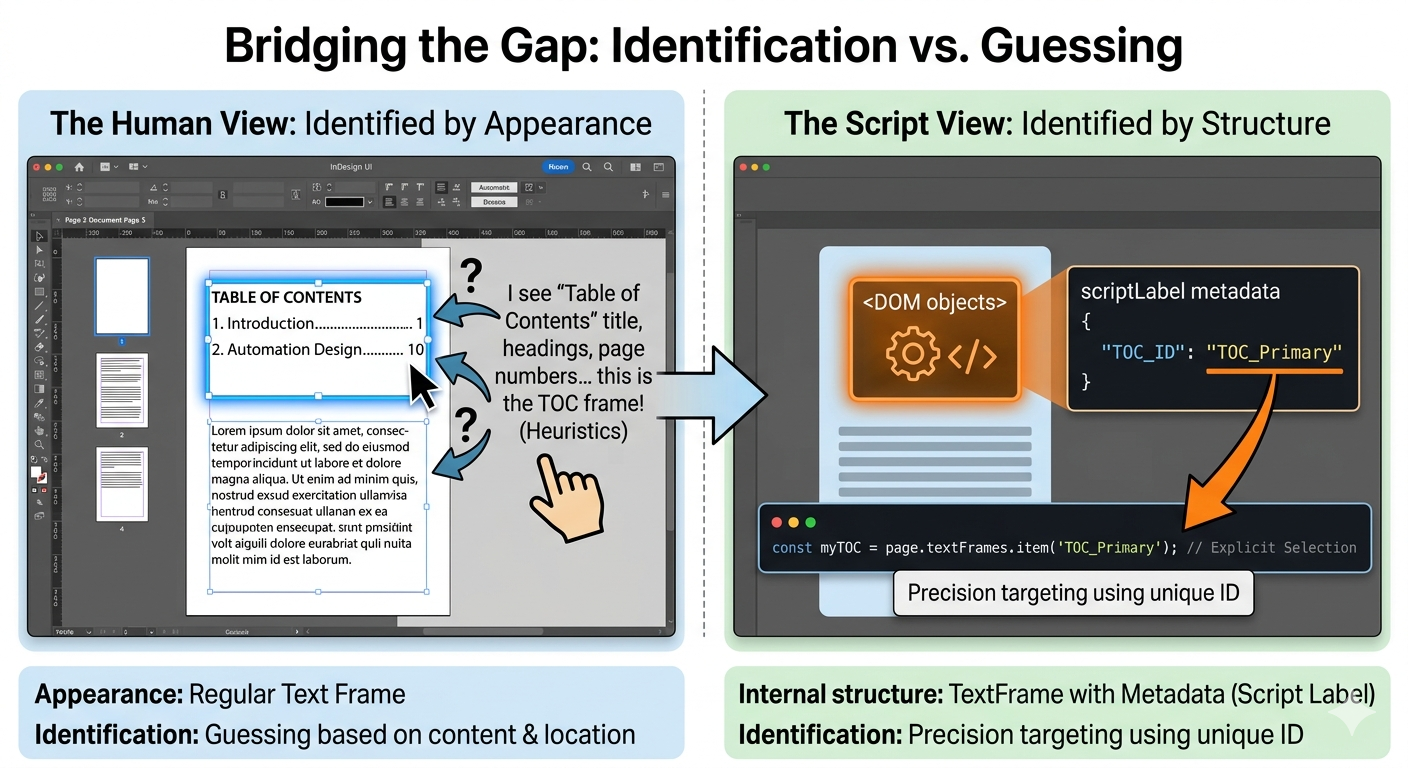
The safer approach is not to guess what the TOC is.
The safer approach is to make the TOC identifiable by design.
That means embedding reliable structure into the document so automation does not depend on interpretation. Instead of asking a script to infer whether a frame is a TOC, make that information explicit in the file structure.
Depending on your workflow, that can mean using:
- a dedicated paragraph style
- a dedicated object style
- a dedicated layer
- fixed placement rules
- a script label attached to the relevant page item
This last option is especially practical. In InDesign’s object model, page items support labels and key-value style metadata methods such as insertLabel() and extractLabel(), which makes them useful as lightweight automation identifiers. In real workflows, that is often far more reliable than guessing from layout or text content.
The safest automation is often not smarter detection, but better document structure.
Once you adopt that mindset, the whole problem changes. You are no longer trying to reverse-engineer the file. You are designing the file so automation can work safely from the beginning.
In some cases, regeneration is safer than update
There is another practical shift that follows from this.
If detection is weak, regeneration may be safer than update.
Instead of trying to find an existing TOC frame and update it in place, you may get a more stable workflow by treating TOC as a controlled output:
- identify the target area through explicit document structure
- remove the old TOC under known conditions
- regenerate the TOC from the correct TOC style
- place it back into a known layout context
This has an important advantage beyond stability.
Regeneration does not just rebuild content. It also lets you reapply the correct TOC style every time. That matters in real production, because hand-adjusted formatting often accumulates over time. If someone manually tweaks the TOC, an “update” workflow may preserve unwanted leftovers. A regeneration workflow gives you a cleaner reset to the intended structure.
Of course, this only works well when the surrounding rules are controlled. If placement, style usage, and layout boundaries are undefined, regeneration can be just as risky. But in a template-driven workflow, regeneration is often the more predictable strategy.
Not because it is more sophisticated.
Because it is more controllable.
What this means for automation design
This is not really a TOC-only lesson.
It is a broader InDesign automation lesson.
Some parts of a document are easy to automate because the DOM exposes them clearly. Some are hard not because they are conceptually complex, but because the information you need is not exposed in a reliable way.
When that happens, there are two possible responses.
One is to keep adding more detection logic, more exceptions, and more edge-case handling.
The other is to redesign the workflow so identification becomes explicit.
The second path is usually better.
If your automation depends on fragile guessing, the real fix is often not better code. It is better structure. Better naming. Better labels. Better layout rules. Better production discipline.
That is the real shift from detection to design.
And once you make that shift, your scripts usually become simpler, safer, and easier to maintain.
Conclusion
TOC is one of those classic InDesign cases where the UI makes something look simpler than it is.
Yes, InDesign can update a TOC.
But from the scripting side, reliably identifying a TOC as a specific frame or story is much harder than many people expect. That is why TOC automation often becomes brittle when it is built on inference.
The practical solution is not to write increasingly clever code that tries to guess what the file means.
The practical solution is to make the file readable to automation in the first place.
When the DOM is a black box, document structure has to become your map.
Stop guessing in code. Start designing for automation.